Fault line
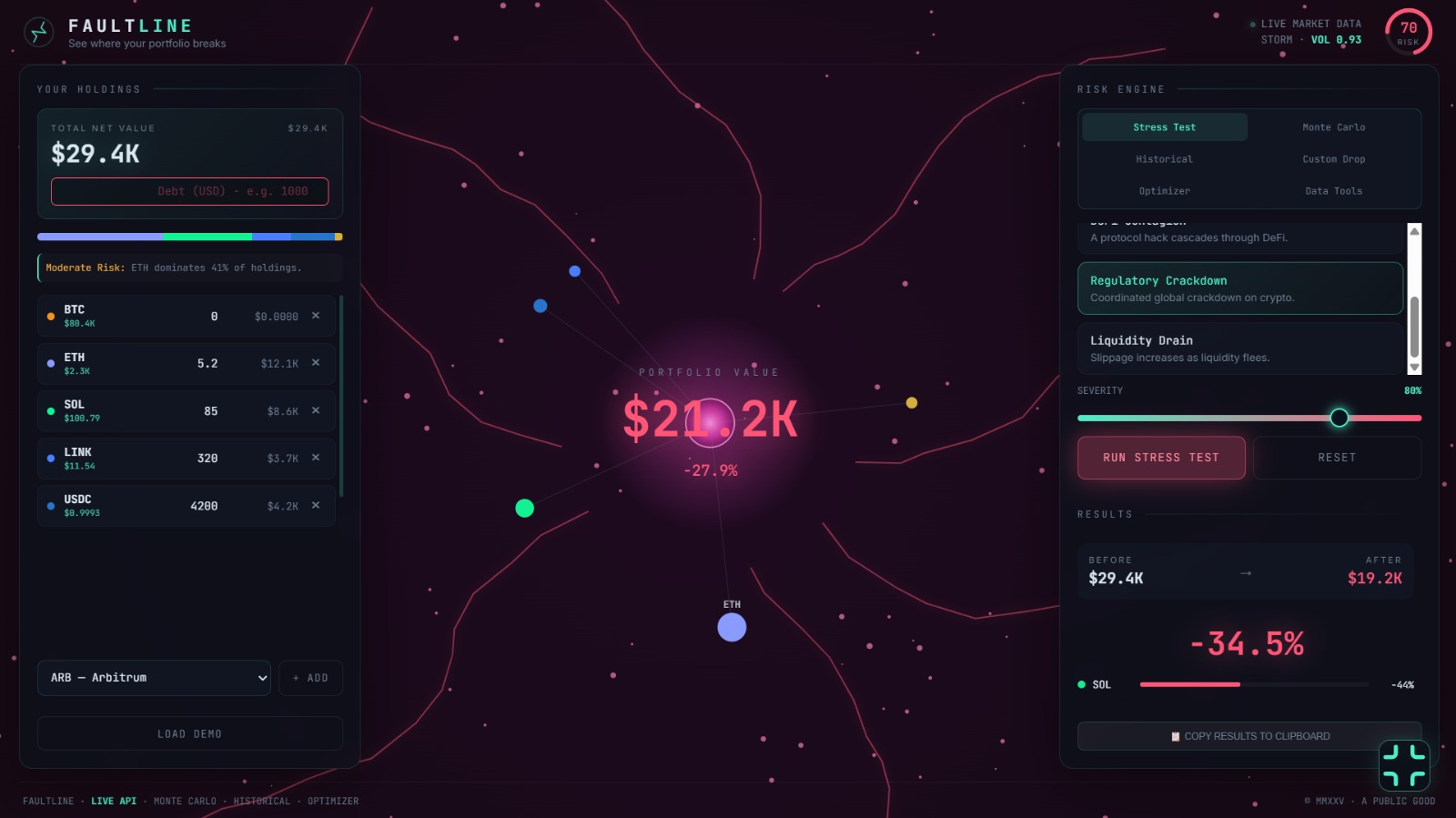
Stop guessing. Start stress-testing.
Crypto is volatile, but your portfolio doesn't have to be blind. Meet Faultline — an institutional-grade crypto risk engine that doesn't just track your bags; it breaks them before the market does.
How it works: Simply input your holdings and run a "Stress Test." Watch as our immersive, glowing WebGL canvas visually simulates orbital collapse under real-world disasters—from the FTX fallout to a stablecoin depeg or a custom 50% BTC crash. Powered by Monte Carlo simulations and real-time API data, Faultline calculates your exact Value at Risk (VaR) and tells you exactly where your portfolio is most vulnerable.
The Potential: This isn't just for retail traders; it's a vital tool for DAO treasuries and institutional investors who need to stress-test their leverage and visualize hidden concentration risks.
The Tech Flex: Built entirely by a dual-AI workflow. Claude architected the enterprise-grade React/TypeScript math engine, while ChatGPT engineered the high-performance Canvas animations and state management. Two AIs, one seamless survival tool.
Ready to see where your portfolio breaks?
Tech stack
- Claude
- ChatGPT
Links
Prompt steps
Step 1
Act as a Senior Frontend Architect and UI/UX Expert. We are building a production-grade crypto risk engine called "Faultline".

**STRICT ARCHITECTURAL RULES:**
- Stack: React 18, TypeScript, Vite, Tailwind CSS.
- DO NOT output a single-file HTML script. This is a professional application.
- Output the code file-by-file (e.g., `src/components/Header.tsx`).
- Another engineer will handle the Canvas animations, API integrations, and state management (Zustand). Your focus is purely on the UI Components, Tailwind styling, and Pure Math Utilities.

### Project Specs & Visual Design
- **Theme**: Institutional Cyberpunk. Tailwind classes for glassmorphism (`backdrop-blur-md`, `bg-slate-900/70`, `border-slate-700/50`).
- **Accents**: Neon green (`#4af0c8`) for safe/success, Red (`#ff5577`) for danger.
- **Typography**: `Inter` for UI text, `JetBrains Mono` for numbers and prices.
- **Layout**: 3-column desktop grid (`w-[360px] flex-1 w-[400px]`), collapsing to a single column on mobile.

### Your Deliverables (Generate these files):

**1. `src/types/index.ts`**
Define strict TypeScript interfaces for:
- `Asset` (symbol, name, id, price, color, vol, icon)
- `Holding` (asset symbol, amount)
- `Scenario` (id, name, description, impact function)
- `SimulationResult` (before, after, pctChange, perAsset data, var95)

**2. `src/utils/math.ts`**
Write pure, exported math functions with no side effects:
- `computeGrossTotal(holdings, assets)`
- `computeNetTotal(holdings, assets, debt)`
- `computeStandardScenario(holdings, assets, scenario, severity, debt)`
- `computeHistoricalScenario(holdings, assets, event, debt)`
- `computeCustomScenario(holdings, assets, targetDrop, debt)`
- `computeRiskScore(holdings, assets)` -> Returns 0-100 based on HHI concentration, scenario loss, and stablecoin ratio.
- `optimizePortfolio(currentTotal, riskTolerance)` -> Returns a new array of holdings based on Conservative, Balanced, or Aggressive weights.

**3. `src/components/Header.tsx`**
- React component receiving `riskScore` as a prop.
- Renders the logo, "LIVE MARKET DATA" indicator, and a circular SVG Risk Gauge showing the 0-100 score. The gauge must dynamically change color (green -> amber -> red) based on the score.

**4. `src/components/HoldingsPanel.tsx`**
- Receives `holdings`, `assets`, `debt`, and update functions as props.
- Displays Total Net Value and Gross Value.
- Input field for `Debt` (red text).
- An Allocation Bar: A horizontal flex container where each segment's width and background color match the asset's weight in the portfolio.
- List of Holdings: Each row must display the asset color dot, Symbol, **Live Price (small green mono text below symbol)**, amount input, total value, and a remove button.
- An "Add Asset" dropdown and a "Custom Coin" input form.

**5. `src/components/RiskPanel.tsx`**
- Receives current `simMode` and `results` as props.
- Tabbed interface: Stress Test, Monte Carlo, Historical, Optimizer, Data Tools.
- **Stress Test Tab**: Map through an array of predefined scenarios, render selectable buttons, a severity slider, and a "Run Simulation" button.
- **Results Section**: Render a "Before vs After" summary card. Show the Drawdown percentage in large text. Render a list of per-asset impacts with horizontal progress bars indicating the percentage drop.

Please begin by generating `src/types/index.ts` and `src/utils/math.ts`. Ensure the math functions are robust and ready to be consumed by the main React store.
Step 2
Act as a Senior React Developer. We have a React + TypeScript + Vite project called "Faultline".
Another architect has already generated the UI components (`Header.tsx`, `HoldingsPanel.tsx`, `RiskPanel.tsx`) and pure math functions (`src/utils/math.ts`).

Your job is to write the state management, API services, and the Canvas animation engine.

### Your Deliverables:

**1. `src/store/usePortfolioStore.ts`**
Use Zustand for state management. Define the store with:
- State: `holdings`, `debt`, `assets` (default list of 12 coins), `activeTab`, `scenario`, `severity`, `results`, `isSimulating`.
- Actions: `addHolding`, `removeHolding`, `updateAmount`, `setDebt`, `setScenario`, `setSeverity`, `runSimulation` (which calls the math utilities), `optimize`.

**2. `src/services/api.ts`**
- `fetchLivePrices(assetIds: string[])`: Connects to CoinGecko `/simple/price` API. Returns a record of `{ [id]: { usd: number } }`. Handle rate limits and errors gracefully.

**3. `src/components/CenterStage.tsx` (The Canvas Core)**
- Create a React component with a `<canvas>` element.
- Write a `useEffect` that handles a `requestAnimationFrame` loop.
- Draw the "Live Motion Wallpaper":
  - A central glowing core representing the portfolio.
  - Orbiting nodes representing each asset. The nodes must render the actual coin images (fetch from `https://assets.coincap.io/assets/icons/...`) scaled based on portfolio allocation.
  - Floating background particles.
  - Shockwave and faultline animations that trigger when a stress test runs.
- Hook it up so it listens to the Zustand store (`state.stress`, `state.results`) to change the visual intensity of the animation (e.g., colors shifting to red when a crash is simulated).

**4. `src/App.tsx` (The Integration)**
- Wire everything together. Import the components, the store, and the API.
- Set up a 3-column CSS grid layout using Tailwind.
- Use `useEffect` to fetch live prices on mount and update the store.
2 likes