A Pomodoro Study Timer with Virtual Plant Growth, Task Organization, Daily Goals, and Streak Analytics
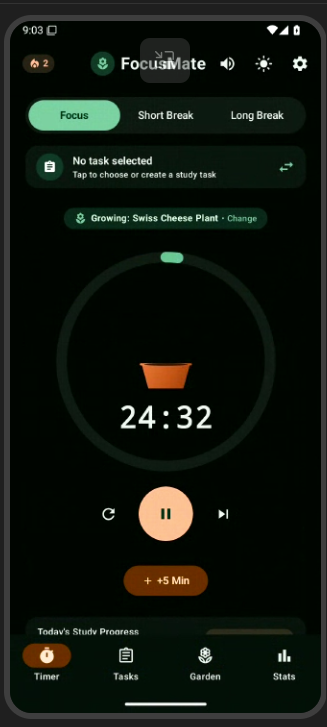
Staying focused while studying can feel exhausting, especially when staring at an endless to-do list. FocusMate transforms solitary study sessions into a calming, rewarding journey using the proven Pomodoro technique combined with gamified botanical rewards. Instead of watching a sterile countdown clock, students watch a living virtual plant evolve in real time. Starting as a humble seed resting in a terracotta pot, the plant gently sprouts leaves, sways in a subtle breeze, and blossoms into a radiant flower as the 25-minute focus session counts down. Upon completion, the plant is harvested directly into the student’s personal Botanical Garden, commemorating their dedication with collectible species such as Monstera, Bonsai, Sunflower, and Sakura. Beyond the soothing visuals, FocusMate delivers practical productivity essentials. Students can categorize tasks by subject—from Mathematics and Programming to Literature—track estimated versus completed Pomodoros, and set customizable daily study goals. Interactive weekly bar charts visualize focus habits, while a streak tracker with a flame badge motivates consistent daily discipline. With support for instant dark/light themes, customizable session intervals, and gentle audio chimes, FocusMate creates a distraction-free sanctuary designed to turn study routines into thriving habits.
Tech stack
- ChatGPT
Links
Prompt steps
Step 1
Build a modern Android productivity application named FocusMate — Simple Study Timer using Kotlin, Jetpack Compose, Material Design 3, and Room database for local persistence. The app helps students focus using the Pomodoro technique with a unique virtual plant growth mechanic.
The app must include four primary navigation tabs:
Timer Screen: A circular countdown timer supporting three modes: Focus (25m), Short Break (5m), and Long Break (15m). Center-stage inside the timer ring is an animated custom Compose Canvas showing a growing virtual plant in a terracotta pot. As the timer progresses from 0% to 100%, the plant dynamically transitions from seed to sprout, growing leafy stems with natural breeze sway, and finally blooming into mature flowers. Users can pick from 6 plant species (Monstera, Bonsai, Cherry Blossom, Golden Sunflower, Desert Jade, Lucky Bamboo). Include Play/Pause, Reset, Skip, and +5 Min controls, active task link, and chimes upon session completion.
Botanical Garden: A showcase gallery displaying all harvested plants grown during completed sessions. Each plant card displays the species, study duration, subject studied, and harvest timestamp, opening a botanical fact modal when clicked.
Tasks Screen: Comprehensive subject-based task management. Users can add assignments with titles, categorized tags (Math, Coding, Science, Reading, History, Art, General), and estimated Pomodoros (1–8 dots). Tasks feature completion checkboxes, delete actions, and a "Focus" button that sets the task active on the timer.
Step 2
Analytics Screen: A daily study target card with a live progress ring, an unbroken study streak counter with a flame badge, an animated 7-day weekly bar chart comparing daily minutes against the target, and a subject distribution breakdown.
Include a Settings dialog allowing users to adjust Pomodoro durations, toggle audio/haptic feedback, set daily study targets, and switch between Botanical Light and Midnight Dark themes. Ensure edge-to-edge layout, responsive touch targets, and full Room database seeding on first launch.
4 likes · 1 comment
Comments (1)
Cool first build! Good way to focus without distraction