MindSpark
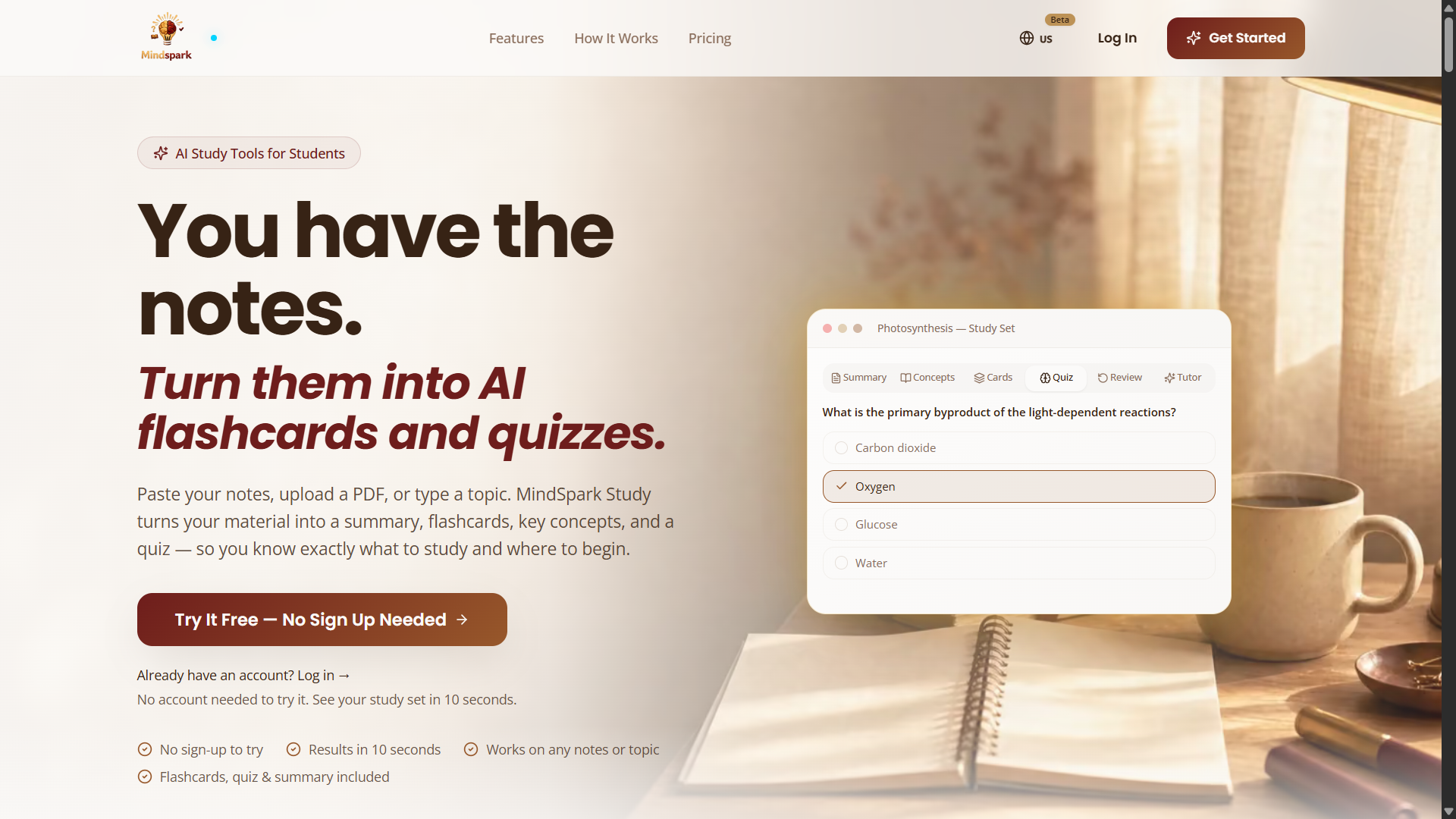
MindSpark Study grew from its creator's personal frustration with traditional studying.
Spending hours rereading notes did not always lead to better understanding or memory. The creator wanted a simpler way to turn scattered information into structured, active learning.
Using Lovable to help build the website, the independent maker created a tool that transforms lecture notes into flashcards, quizzes, summaries and examination practice.
The mission is to make studying less overwhelming and give learners practical tools for understanding and remembering what they study.
Tech stack
- Claude (Opus 5.5)
Links
Prompt
PROJECT: AI-NATIVE PERSONAL STUDY & EXAM PREPARATION STUDIO

Project Vision

Build a beautifully designed, fully functional AI-powered learning platform that transforms unorganized educational materials into interactive, personalized study experiences.

The central problem is simple: students spend too much time reading, highlighting, organizing notes and preparing revision materials, but often struggle to remember what they have studied.

Create a platform that changes this experience.

Instead of forcing students to manually create flashcards and practice questions, allow them to upload their lecture notes, textbooks, PDFs, presentations or handwritten notes and receive structured learning materials generated by AI.

The platform should support understanding, active recall, revision planning, knowledge assessment and consistent learning habits.

Make it a focused product that an independent developer can realistically build with AI coding assistance.

1. Premium Landing Page

Design a modern, visually distinctive educational website with an inviting, professional aesthetic.

Use warm cream backgrounds, deep burgundy and espresso accents, carefully selected typography and subtle golden highlights.

The hero section should communicate the main purpose immediately:

"Turn Your Notes Into Flashcards, Quizzes, and Practice Exams in Seconds."

Include a short description, an interactive study-set preview and prominent buttons for trying the product.

Display an example showing a paragraph of biology notes being transformed into flashcards, multiple-choice questions and a concise summary.

Create smooth animations illustrating the process of converting raw information into organized study materials.

Include feature explanations, interactive demonstrations, pricing information and a clear call to action.

Avoid generic AI startup templates, excessive gradients and unnecessarily complicated navigation.

2. Intelligent Document Upload

Create a document-processing workspace where users can upload learning materials.

Support:

- PDF documents.
- Word documents.
- PowerPoint presentations.
- Plain text files.
- JPG and PNG images.
- Pasted text.
- Manually entered topics.

Provide drag-and-drop uploading, file validation, progress indicators and clear processing states.

Extract readable content from uploaded documents.

Use appropriate document-parsing libraries for digital files and a vision-capable AI service for photographed notes when necessary.

Preserve headings, sections, important definitions and the logical order of information.

Allow users to review extracted text before generating learning materials.

3. AI Learning Content Analyzer

Integrate Anthropic Claude or another capable language model through secure server-side endpoints.

When a user provides study material, analyze the content to identify:

- Main subject.
- Important topics.
- Key definitions.
- Essential facts.
- Relationships between concepts.
- Formulas and equations.
- Potential examination topics.
- Areas requiring further explanation.

Convert the analysis into structured JSON that can be reused throughout the application.

Ground generated learning content in the uploaded material.

When information is missing or unclear, mark it appropriately instead of fabricating explanations.

Provide optional source references to document pages or sections.

4. AI Summary Generator

Build a feature that transforms lengthy study notes into clear, organized summaries.

Provide three summary formats:

Quick Summary: A short overview highlighting the most important ideas.

Detailed Summary: A structured explanation covering major topics, definitions and relationships.

Revision Notes: Compact notes optimized for last-minute review.

Support headings, bullet points, highlighted terms, tables and appropriately rendered mathematical notation.

Allow students to adjust explanation depth and regenerate specific sections.

Keep summaries faithful to their original learning materials.

5. Intelligent Flashcard Generator
Develop an AI-powered flashcard creation system.

Generate question-and-answer cards from uploaded content.

Each flashcard should focus on one clearly defined concept.

Support:

- Definition cards.
- Concept explanation cards.
- Formula recall cards.
- Comparison cards.
- Application questions.
- Image-supported cards where appropriate.

Users should be able to flip cards, reveal answers, mark difficulty and move between questions.

Include editing, deletion, duplication and manual card creation.

Store cards in organized study decks.

Ensure questions are answerable using the provided learning material.

6. AI Quiz Generator

Create a quiz-generation system that produces meaningful questions from study documents.

Support multiple-choice questions, true-or-false questions, short answers and matching exercises.

Allow users to configure:

- Number of questions.
- Difficulty level.
- Selected topics.
- Question format.
- Time limit.
- Whether explanations appear immediately or after completion.

Generate plausible distractors for multiple-choice questions.

Avoid ambiguous questions and multiple correct answers unless explicitly supported.

Provide detailed explanations grounded in the source material.

Store quiz results for future progress analysis.

7. Practice Examination Simulator

Develop a dedicated exam-preparation environment.

Students should be able to generate complete practice examinations covering selected study materials.

Include a timer, question navigator, progress indicator and submission confirmation.

Allow students to flag difficult questions and return to them later.

After submission, display results containing:

- Overall score.
- Correct and incorrect answers.
- Performance by topic.
- Explanations for mistakes.
- Suggested areas for further revision.

Support exam retakes using alternative questions drawn from the same source content.

Distinguish automatically graded objective questions from AI-evaluated open-ended responses.

8. Smart Study Mode

Create an adaptive study experience that combines flashcards, quizzes and revision sessions.

Use recorded study performance to identify concepts that need additional practice.

Present difficult or repeatedly missed concepts more frequently.

Allow users to select short study sessions, such as 5, 10 or 20 minutes.

Provide an intelligent mix of questions based on recent answers.

Show a clear explanation of why a concept has been selected for review.

Keep study recommendations adjustable rather than forcing rigid learning schedules.

9. Spaced Repetition Engine

Implement a deterministic spaced repetition algorithm.

Track each flashcard's review history, recall difficulty and next scheduled review date.

Use an established scheduling approach such as FSRS or a well-documented simplified alternative.

Allow students to grade their recall using options such as Again, Hard, Good and Easy.

Automatically calculate future review dates.

Create a daily review queue and a calendar showing upcoming study sessions.

Separate the scheduling algorithm from AI-generated learning content so review intervals remain reproducible.

10. AI Personal Study Assistant

Integrate a conversational AI tutor that understands the student's current study materials.

Allow students to ask questions such as:

"Explain this topic more simply."

"Give me an example of this concept."

"Why is my answer incorrect?"

"Test me on the topics I keep missing."

"Create five harder practice questions from this chapter."

The assistant must use the student's uploaded material as the primary source of information.

Allow supplemental explanations when requested, clearly distinguishing them from the uploaded content.

Avoid unsupported factual claims.

Provide concise explanations and encourage independent understanding.

11. Speech and Presentation Memorization

Build a feature that helps students memorize speeches, presentations and scripts.

Allow users to paste or upload a prepared script.

Automatically divide the material into manageable sections.
Provide a progressive memorization workflow:

1. Read the complete section.
2. Hide selected words.
3. Attempt to recall missing phrases.
4. Reveal the correct text.
5. Repeat sections requiring improvement.

Add optional speech-to-text recognition for spoken practice.

Compare recognized speech with the original script and highlight substantial omissions.

Allow users to practice without recording or storing their voice.

12. Personal Learning Dashboard

Create a dashboard showing learning activity and progress.

Include:

- Total study sets created.
- Flashcards reviewed.
- Completed quizzes.
- Practice examination scores.
- Study session history.
- Upcoming reviews.
- Progress by topic.

Use compact, meaningful charts and progress indicators.

Allow users to filter activity by subject and date.

Avoid presenting study frequency as proof of mastery.

13. Study Library

Create a personal library where users can organize generated learning materials.

Support folders, subjects, tags and searchable study sets.

Allow users to rename, duplicate, archive and delete materials.

Store original documents, summaries, flashcards, quizzes and performance history in appropriately related database tables.

Provide a clear way to revisit previously studied material without regenerating content.

14. Guest Demo Experience

Allow first-time visitors to test the platform without creating an account.

Provide an interactive demonstration that transforms a short sample of educational material into flashcards and quiz questions.

Apply reasonable usage limits to anonymous AI generation.

Clearly explain which features require an account.

Ensure demo-generated materials are not presented as saved private projects.

15. Secure Authentication and Database

Use Supabase Auth for account registration, login and password recovery.

Implement PostgreSQL tables for user profiles, documents, study sets, flashcards, quizzes, examination attempts and review history.

Apply Row Level Security so users can access only their own private materials.

Use secure object storage for uploaded documents.

Provide account deletion, document removal and appropriate data-retention controls.

16. AI Processing Architecture

Design a modular backend containing:

Document Parser: Extracts content from uploaded files.

Content Analyzer: Identifies concepts and educational structure.

Generation Engine: Produces summaries, flashcards and quizzes.

Validation Layer: Checks generated data against defined schemas and available source content.

Study Scheduler: Calculates upcoming reviews.

Learning Assistant: Provides explanations based on saved study context.

Use background processing for large documents.

Implement job statuses, retries, error logging and sensible usage limits.

Keep model credentials on the server.

17. Technical Stack

Use Lovable as the initial AI-assisted development environment.

Implement the frontend using React, TypeScript and Tailwind CSS.

Use Framer Motion for smooth transitions.

Use Supabase for authentication, PostgreSQL data storage and file management.

Integrate Anthropic Claude API for educational content understanding and question generation.

Use PDF parsing libraries, document conversion utilities and an appropriate vision model for image-based notes.

Implement schema validation using Zod.

Use a lightweight charting library for progress visualization.

Deploy through a reliable hosting provider with secure environment variables.

These are proposed implementation choices, not claims about MindSpark Study's undisclosed internal AI infrastructure.

18. Premium Visual Design

Create a recognizable educational identity with warm ivory surfaces, burgundy typography, restrained gold accents and beautifully designed study cards.

Use a clear layout with a left navigation sidebar, central learning workspace and compact contextual controls.

Prioritize readability and distraction-free learning.

Implement elegant flashcard flipping animations, smooth quiz transitions and subtle progress feedback.
Make the application responsive across desktop, tablet and mobile screens.

Ensure accessible keyboard controls and appropriate color contrast.

Avoid unnecessary visual effects that distract from the learning experience.

19. Monetization

Implement a transparent freemium structure.

Provide a limited free plan for generating and reviewing study materials.

Offer optional paid tiers with higher usage allowances and additional features such as practice exams, advanced exports and longer study histories.

Integrate Stripe Checkout only when payment functionality is ready.

Verify successful payments through secure server-side webhooks.

Communicate usage limits and subscription terms clearly.

20. Development Roadmap

Phase One: Landing page, authentication, document upload and text extraction.

Phase Two: Real AI-powered flashcard, summary and quiz generation.

Phase Three: Study library, practice examinations and performance tracking.

Phase Four: Spaced repetition and adaptive study sessions.

Phase Five: AI tutor, script memorization and advanced export features.

Build and test each phase before adding more complex functionality.

Do not represent unfinished features as operational.

Final Deliverables

Create a production-ready independent learning application containing a premium public website, document processing, AI-generated study sets, interactive flashcards, quizzes, practice exams, revision scheduling, personal learning dashboards and a secure backend.

Include a complete README, environment configuration, database migrations and deployment instructions.

The platform should be intuitive enough for a student to upload lecture notes and begin a useful study session in minutes.

Core Philosophy: Don't just reread information. Turn it into knowledge you can recall.