Court sense - Tactics & Trivia
This is my final build for October challenge. during the last moth I learned a lot and found some cool friends.
I mentally needed such environment.
about the build:
Your days of being a casual are over. It’s time to ball out.
Built a dope web app called CourtSense. Here’s the rundown:
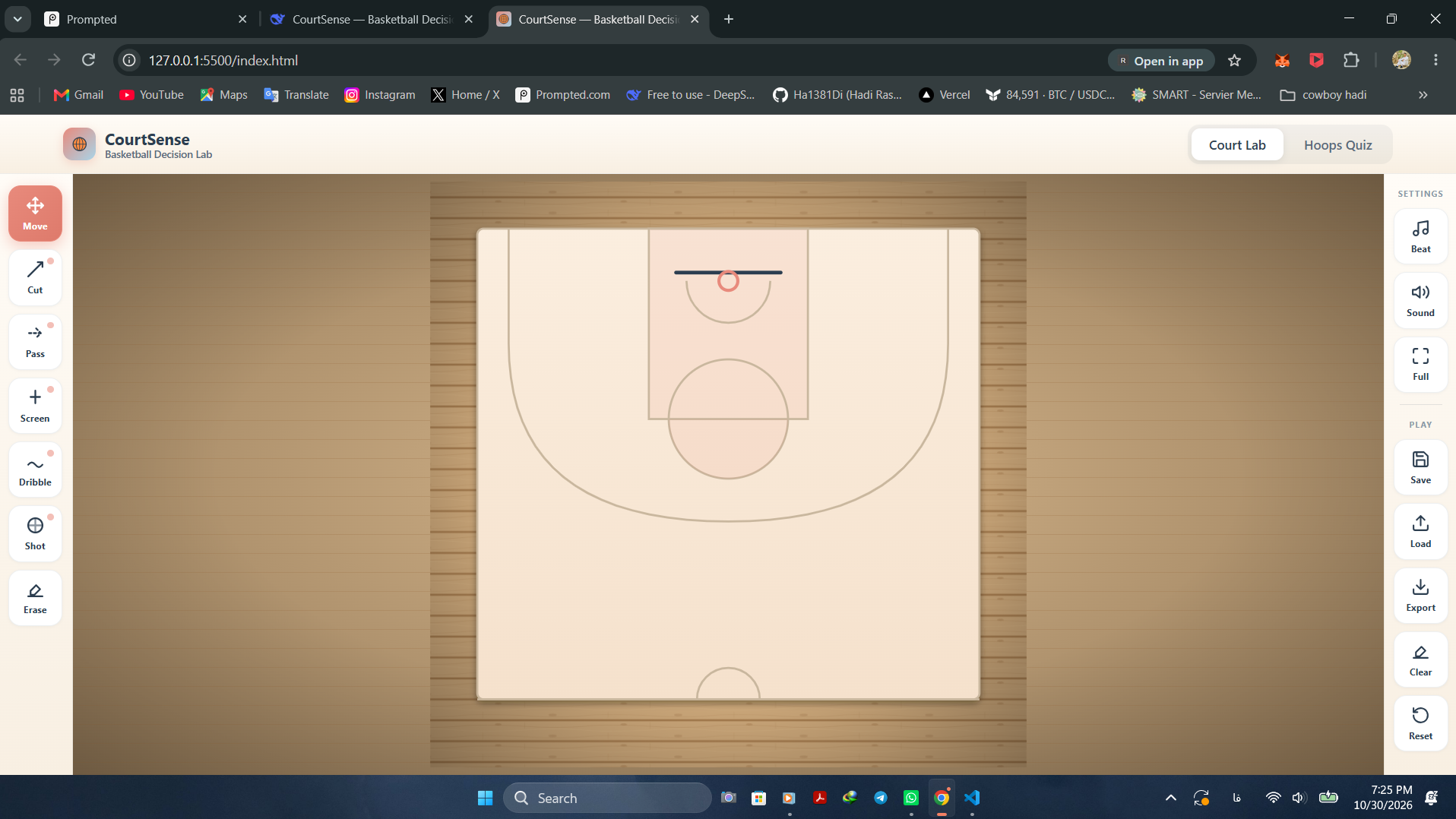
✅ Drag players, draw passes, screens, and shots.
✅ Sick animated crowd cheering you on (they actually jump! 🤩).
✅ Background basketball beat.
✅ A trivia quiz to see if you're a real hoops genius or just a bandwagoner.
✅ Works on everything. Even installs to your home screen.
Zero excuses. Go cook up a play and drop the link for your friends!
i will love to see your feedbacks and warm words.
Tech stack
- Claude (Fable 5.1)
- Vercel
Links
Prompt
Project Name: CourtSense — Basketball Decision Lab
Core Concept: An interactive, free-to-use basketball play designer, tactical simulator, and knowledge quiz wrapped in a modern, glassmorphism UI.

General Requirements:

Usable seamlessly on both desktop and mobile devices.

Fully installable as a Progressive Web App (PWA) with generated maskable icons.

Include a functional fullscreen toggle.

Do not include any promotional or status text in the main UI (e.g., "private," "free," "no accounts," "offline").

Use soft, modern colors: cream, muted coral, mint, sky blue, and dark ink for text.

Design language: Glassmorphism (translucent blurred backgrounds), smooth rounded corners, clean typography.

No motion toggle; animations should be automatic, subtle, and lightweight.

Initial Load (Translucent Splash Screen):

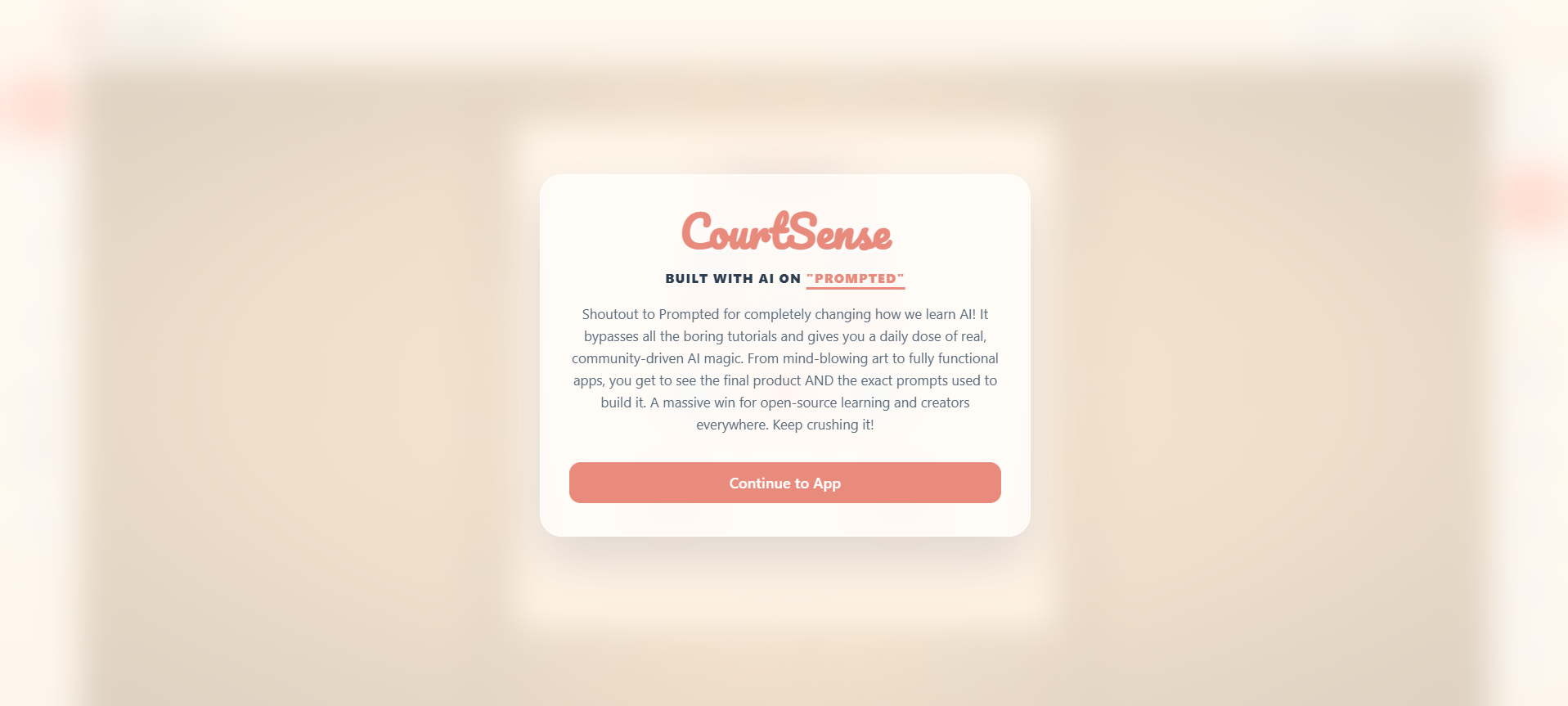
Upon opening the app, display a centered, frosted-glass (translucent) modal overlay that blurs the court behind it.

Use a cool, cursive/street-style font for the main title "CourtSense".

Include the exact text: "BUILT WITH AI ON 'PROMPTED'" where the word PROMPTED is a clickable hyperlink pointing to https://www.prmpted.com/.

Below the headline, include this exact text: "Shoutout to Prompted for completely changing how we learn AI! It bypasses all the boring tutorials and gives you a daily dose of real, community-driven AI magic. From mind-blowing art to fully functional apps, you get to see the final product AND the exact prompts used to build it. A massive win for open-source learning and creators everywhere. Keep crushing it!"

Include a prominent "Continue to App" button.

Clicking the button must smoothly fade out the overlay and simultaneously unlock the browser's audio context (waking up the sound engine).

Layout & UI Structure:

Header: Slim top bar featuring the CourtSense brand logo on the left and a center-aligned tab switcher ("Court Lab" and "Hoops Quiz").

Desktop Layout: The screen is divided into three columns. A vertical rail on the left, a large central stage, and a vertical rail on the right. The center stage must take up the maximum available space.

Mobile Layout: The vertical rails automatically transform into horizontal scrollable bars at the top and bottom of the screen, leaving the central court maximized.

Left Rail (Tools): Vertical stack of attractive icon buttons: Move, Cut, Pass, Screen, Dribble, Shot, Erase. Active tools highlight with a coral gradient.

Right Rail (Actions): Vertical stack of buttons divided by a subtle line. Top section: Beat (music), Sound (effects), Fullscreen, Install. Bottom section: Save, Load, Export (PNG), Clear, Reset.

Court Lab View (The Stage):

The stage background must feature a realistic wood floor texture with a vignette shadow.

In the center sits the basketball court with accurate lines (paint, free throw circle, three-point arc, hoop, backboard).

Crowd: Surrounding the outside of the court on the wood floor, generate a crowd of tiny stick-figure people. They should be scaled up to be clearly visible (large scale), randomly colored, and feature a continuous, asynchronous jumping animation to simulate cheering.

Interactivity:

Users can drag and drop offensive (coral) and defensive (sky blue) players around the court.

Users can select a tool from the left rail and draw paths on the court. Passes are dashed mint lines, cuts are solid dark lines, screens are thick dashed coral lines, dribbles are dashed blue lines, and shots are solid orange lines.

Coordinate accuracy is critical: Pointer-to-court coordinate mapping must be exact so drawn lines and dragged players align perfectly with the mouse or touch cursor, regardless of screen size or aspect ratio.

Audio Engine (Synthesized via Web Audio API):

Sound Effects: Soft, satisfying tones on interaction. A subtle tick for button clicks, a gentle swish for drawing a line or a correct quiz answer, and a soft thud for errors or resets.

Background Music: A continuous, looping, synthesized basketball hip-hop beat. Include a kick drum, snare, hi-hats, a soft ball-bounce sound, a walking bassline, and a periodic swish accent. Both audio channels (music and effects) must have independent toggle buttons.

Hoops Quiz View:

A clean, centered card layout.

Game Modes: "Quick Shot" (10 questions) and "Streak" (15 questions).

Content: Multiple-choice questions about NBA players, European clubs, stats, and history.

Mechanics: Dynamic score tracking with streak bonuses. Selecting an answer triggers immediate audio feedback (swish or thud) and visual highlighting (green for correct, red for wrong).

Results Screen: Displays final score, correct answers, and best streak, followed by a scrollable review of all questions and the correct answers, plus a "Play Again" button.3 likes · 1 comment · 1 view
Comments (1)
keep cooking 💪