Fickle fate
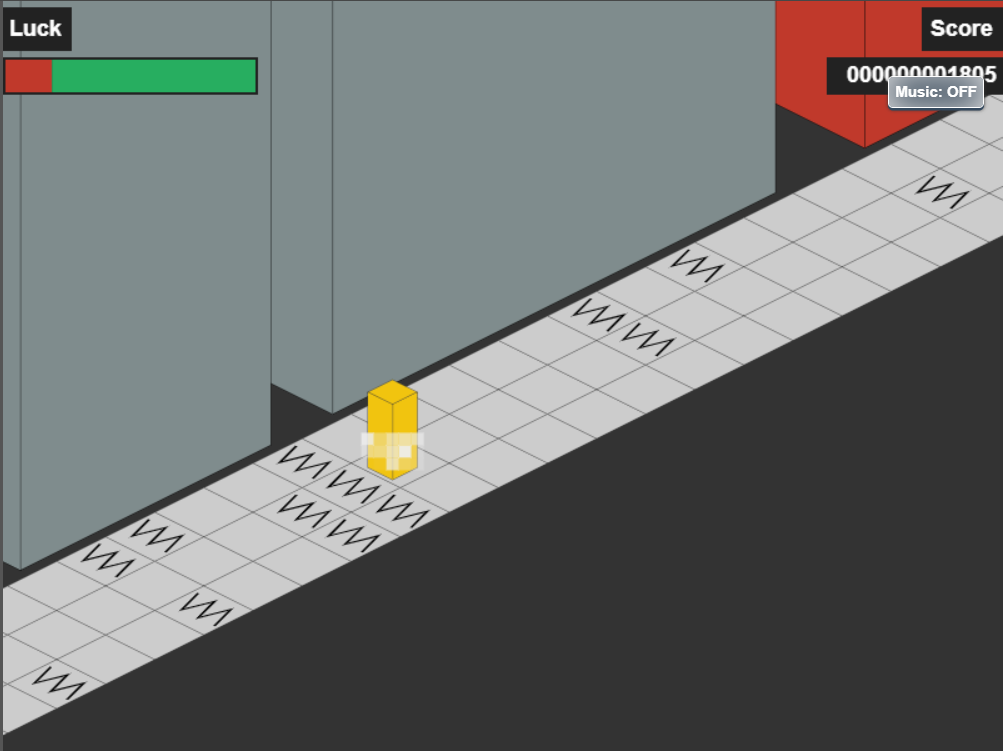
somehow my build got deleted, not a problem here it is again.
Basically, you're a naked block (don't worry, it's censored) just out for a jog in a trippy 3D-style world. It’s an endless runner where you dodge obstacles and jump across lanes. But here’s the catch: don't step on the cracks. If you do, your "Luck" meter starts draining, and if it hits zero or you fall off the edge, you're done.
Give it a spin and try not to rage quit. Let me know what you think!
Tech stack
- Claude Code
- Vercel
- ChatGPT
Links
Prompt
Act as an expert HTML5 Canvas and JavaScript game developer. Create a complete, single-file HTML game (HTML, CSS, and JS all in one file) called 'Fickle Fate'. The game is a fast-paced, endless 3D isometric runner. Do not use any external libraries, images, or audio files. Everything must be generated procedurally via Canvas and the Web Audio API.

1. Core Gameplay & Visuals:

The Player: A simple 3D yellow block (representing a censored naked person) running forward along an isometric path.

The Environment: Draw an isometric world using a 2D canvas. The path consists of alternating black and white checkered tiles. On either side, generate random 3D geometric buildings in various muted colors (blues, purples, grays, reds, greens). Use an orthographic projection (ortho) with a 45-degree angle for the isometric math.

Mechanics: The player automatically runs forward (the world moves toward the player). The player can move left/right across three lanes and jump.

The "Luck" System: Some sidewalk tiles are "cracked". If the player lands on a cracked tile, they lose "Luck". If they fall off the path, the game is over. If Luck reaches 0, the game is over. Luck slowly regenerates over time.

Controls: Use A/D or Left/Right arrows to change lanes. Use W, Space, or Up arrow to jump. Use P to pause and F for fullscreen. Add on-screen touch buttons for Mobile users (Left, Jump, Right).

2. UI and HUD:

Main Menu: Title "Fickle Fate" in large green text with a white shadow. Below it, a brief humorous instruction text, followed by visual keyboard key representations for the controls. A white "Start Game" button.

In-Game HUD: Top-left shows a green-to-red Luck bar. Top-right shows a 12-digit padded Score.

Game Over Screen: When the player dies, show a dark scorecard box displaying "Score: [X]" and a red "New High Score!" text if applicable. Show a "Go Again" button.

The Credit Text: Positioned at the bottom center of the screen, always visible on the menu and game over screens (hidden during active gameplay). It must be exactly: A Game By Johan Gordon For Prompted.com contest. Make the text white, but make the word "Prompted.com" colored red, underlined, and clickable. The link must open https://www.prmpted.com/?ref=johan in a new tab. Add a subtle hover effect to the link.

3. The Procedural Music Engine (Web Audio API):

Create a background music system using the Web Audio API that generates a tense, robotic, and glitchy vibe (no external MP3s).

The Sound: Use an interval loop (around 150 BPM / 200ms). On every beat, generate a random note from a minor pentatonic scale using a square or sawtooth oscillator to sound robotic. Randomly apply quick pitch bends for a "glitch/chance" effect. Add a heavy, low-frequency robotic kick drum synth every 4th beat. Keep the volume low so it doesn't overpower the game.

The Toggle: Add a UI button in the top right corner that says "Music: OFF". When clicked, it starts the audio (browsers require a user click to start audio) and changes the text to "Music: ON" with a red background. Clicking it again stops the music and resets the button.

Ensure the code is compact, well-commented, and runs smoothly at 60fps. Use requestAnimationFrame for the game loop. The canvas size should be 800x600, and scale appropriately for fullscreen.5 likes · 1 comment · 1 view
Comments (1)
Damn man this game really is fun. Could easily see myself losing a lot of time playing this. Has a lot of potential too