Pocket Maze
Tech stack
- Claude
Links
Prompt
POCKET MAZE: the builder's FAQ
This document is a list of the questions you'll ask while building POCKET MAZE, with the answers already written. Read all of it, then build the whole game in a single pass. Don't stop to check in, test it yourself, fix what breaks, and give it back finished with an honest note on what you checked and what you couldn't.

What is it, in one breath?
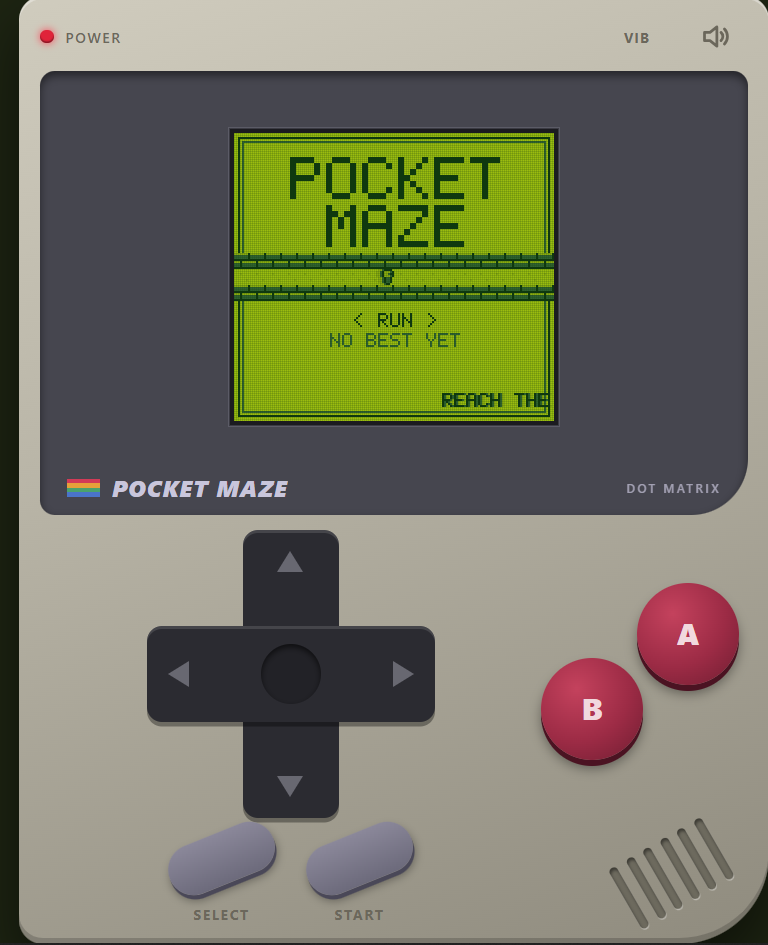
A maze game that pretends to be a battery-powered handheld console from the 1990s. You guide a tiny runner through randomly generated mazes. Every maze has a move budget: reach the exit before you run out of steps. Clear a maze, the next is bigger and the budget is tighter. Lose all your batteries and it's over.

What should it look and feel like?
A four-shade pixel handheld. This is the entire visual identity, so commit to it:

Palette: exactly four colors, a dull olive-green LCD: #0F380F (darkest), #306230, #8BAC0F, #9BBC0F (lightest). Every pixel on the game screen uses only these four. No gradients, no extra colors, no anti-aliasing on the screen content.
Resolution: the game screen is a low-res canvas (for example 160 by 144 logical pixels) scaled up with crisp nearest-neighbor pixels (image-rendering: pixelated) and an integer scale where possible. Add a faint LCD pixel-grid overlay and a very slight ghosting trail on movement so it feels like a real slow screen.
The shell: around the screen, draw a chunky handheld body in a warm gray plastic with a darker bezel, a tiny red power LED, a speaker grille of diagonal slots, a printed "POCKET MAZE" label with a small stripe logo, a plus-shaped D-pad, two round A and B buttons, and START and SELECT pills. The D-pad and buttons are real, working controls on touch screens and desktop. On a wide display, center the whole device on a plain dark-olive desk. On a phone, the device fills the screen with the controls in the lower half, so the thumbs have room.
Type: a pixel font drawn in code from a 5 by 7 bitmap (do not depend on an external pixel font), used for everything on the LCD. Printed labels on the plastic can use a plain system sans.
Sprites: all drawn in code from tiny 8 by 8 pixel arrays: the runner (two-frame walk cycle that faces the direction of travel), walls (a chunky brick-ish tile), floor, the exit (a door that blinks), stars (collectables), batteries (lives), and a little skull for the game over screen.
Motion: movement is grid-based, one tile per step, with a quick 80 ms slide so it feels snappy but alive. Screen transitions are classic: a fast iris wipe or a row-by-row scanline fill. Text appears one character at a time like old dialogue boxes.
How does a level work?
Rule	Detail
The maze	A random perfect maze (every cell reachable, exactly one route between any two cells), made with a seeded recursive-backtracker so it can be reproduced.
Sizes	Level 1 is 7 by 7 cells. Grow by 2 cells every 2 levels, up to 21 by 21.
The budget	Shortest-route length (found by breadth-first search) multiplied by a slack factor that starts at 2.0 and shrinks toward 1.25 as levels rise. Round up and show it as a counter of remaining steps.
A step	Moving into an open neighboring cell costs 1. Bumping a wall costs nothing but plays a dull bump. Walking back along a path counts as steps too.
Stars	3 stars are hidden in dead ends. Picking one up gives +5 steps back and +100 points. Skipping them is fine.
Fog	From level 5 on, you only see the cells within a radius of 3 tiles (the rest is the darkest shade). Visited cells stay dimly remembered. The radius shrinks to 2 from level 12.
Compass	Press the A button once per level to see a short blinking arrow pointing toward the exit's direction along the real shortest path. Costs 3 steps.
Out of steps	You lose a battery (you start with 3). The same maze restarts with a full budget.
Game over	No batteries left. The screen shows the final level, points and a rank.
Winning a level	Reach the exit. Points for the level, plus a bonus for steps left over. Then the next maze.
Points: 100 per level cleared, plus 10 per step remaining, plus 100 per star. A level cleared with no battery lost scores a clean-run bonus of 50.

Ranks (by level reached, then points): under level 4 "Wanderer", 4 to 7 "Scout", 8 to 11 "Pathfinder", 12 to 16 "Navigator", 17 and up "Labyrinth Lord". Adjust the numbers with testing so a decent first run lands around Scout.

What are the modes?
Run: the endless climb described above, with a random seed.
Daily: everyone gets the same sequence of mazes that day, from a seed based on the UTC date. It has its own personal best, and uses the same rules.
Switch with SELECT on the title screen.
What are the controls?
D-pad, arrow keys or WASD move the runner. Holding a direction repeats the step at a steady rate (about 7 per second).
On touch: the on-screen D-pad, and also swipes anywhere on the screen. Respond on pointerdown. No double-tap zoom, no scroll, no text selection.
A: compass. B: restart the level (costs a battery after the first use per level). START: pause. SELECT: mode and sound on the title screen.
Keyboard: Z is A, X is B, Enter is START, Shift is SELECT.
What does it sound like?
Everything is synthesized with WebAudio. No audio files. Think handheld chiptune:

Channels: emulate the classic set: two pulse waves (with selectable 12.5, 25 and 50 percent duty cycles, which you build by summing or by PeriodicWave), one triangle for bass, and one noise channel for percussion and effects.
Step: a tiny blip with a very small pitch change per step.
Bump: a dull, short low pulse.
Star: a quick rising arpeggio.
Compass: two soft beeps.
Low steps: when 5 or fewer steps remain, a tense ticking beep.
Level clear: a bright four-note fanfare. Battery lost: a descending buzz. Game over: a slow sad four-note descent.
Title and in-game music: a short looping chiptune of your own composing with a bassline, an arpeggiated lead and a noise hi-hat, at a steady tempo.
Mute is on SELECT in-game, plus a small speaker icon on the shell, remembered. Audio must start only after the first input and work on iOS Safari. Add a quick vibration on a bump if the device supports it, with a toggle.
How should the code be organized?
Plain static files, no build step, no libraries, no backend, no accounts. It runs from a double-clicked index.html and on any static host. No image or audio files.

index.html: the shell, the controls, the page.
maze.js: pure functions with no DOM, loadable in Node: seeded random generator, the date seed, the recursive-backtracker maze generator, breadth-first shortest path, the budget formula, the fog visibility set, scoring, ranks, and the level progression table.
lcd.js: the 4-shade renderer, the bitmap font, the sprites, the transitions.
chip.js: the audio engine, the sound effects and the music.
cart.js: the share image.
test/maze.test.js: Node tests.
What does the logic have to prove?
The tests must show, over thousands of seeds and every size from 7 by 7 to 21 by 21: the maze is a perfect maze (the number of open passages equals cells minus 1 and every cell is reachable), the same seed always makes the same maze, the shortest path found equals a brute-force check on small mazes, the budget is never smaller than the shortest path, stars land only in dead ends and never on the start or exit, the fog set is correct at every radius, the scoring table above is right in every case, and the rank boundaries work. Have a simple bot play many levels with optimal and sloppy movement and print how often each fails, then tune the slack factor so level 1 to 3 are almost always winnable and level 12 and above are genuinely tense. Run the tests after every change.

How does sharing work?
The cartridge card: drawn on a canvas as a game cartridge label on a plain background: a gray cartridge shape with a printed label showing "POCKET MAZE", the level reached as a big pixel number, the rank, points, stars collected and the date or "RUN" mode, and a tiny pixel drawing of the last maze (the real layout, with the runner's path). Only the four-shade palette on the label art. Output 1080 by 1350 and 1200 by 630. Buttons: Save image, Copy result text, Play again.
Copy text: Pocket Maze: reached level 9, Pathfinder, 2,340 pts. 2 batteries left. Beat that: <link>
Challenge link: ?seed=<n>&beat=<level> plays the same sequence of mazes and shows a "Beat level 9" tag on the title screen.
Replay: from game over back into a new run in one press.
What are the small things that make it feel finished?
The layout works from 360 px wide and up, portrait and landscape, no horizontal scroll. Touch controls are large (at least 64 px) and must not conflict with browser gestures.
It looks right on high-density screens: the LCD canvas stays crisp, with an integer scale.
No console errors. Pause when the tab is hidden. Save the best score and settings in localStorage with try and catch, and work fine without it.
Respect prefers-reduced-motion: drop the ghosting, wipes and blinking.
The title screen shows a blinking "PRESS START" and the best score, and on the first ever play shows a one-line hint ("Reach the exit before steps run out.").
Page title, Open Graph and Twitter tags, and a small inline SVG favicon of the runner.
All words in the game are short, plain and punchy. Never use em dashes or en dashes anywhere, including comments.
What do I hand back?
The finished game in its folder, with tests passing, checked at 360, 768 and desktop widths and with no console errors.
A _deploy folder with only what the live site needs, and the exact command to deploy it to Vercel from inside that folder as a new project named pocket-maze. Don't log in or deploy it yourself.
A short write-up for sharing: a punchy title under 70 characters, a caption of a few lines, the tools list, this FAQ condensed to under about 1,500 characters, and three believable follow-up prompts.
An honest report: what you tested, what passed, and what you couldn't verify (real-phone feel, how the chiptune actually sounds, and swipe behavior on touch).
Anything else?
Don't add features nobody asked for. If time runs short, cut breadth and never polish. Don't claim it works until you've run it. And if the screen ever shows a fifth color, or the controls feel late, fix that before anything else.1 like · 1 comment
Comments (1)
🔥