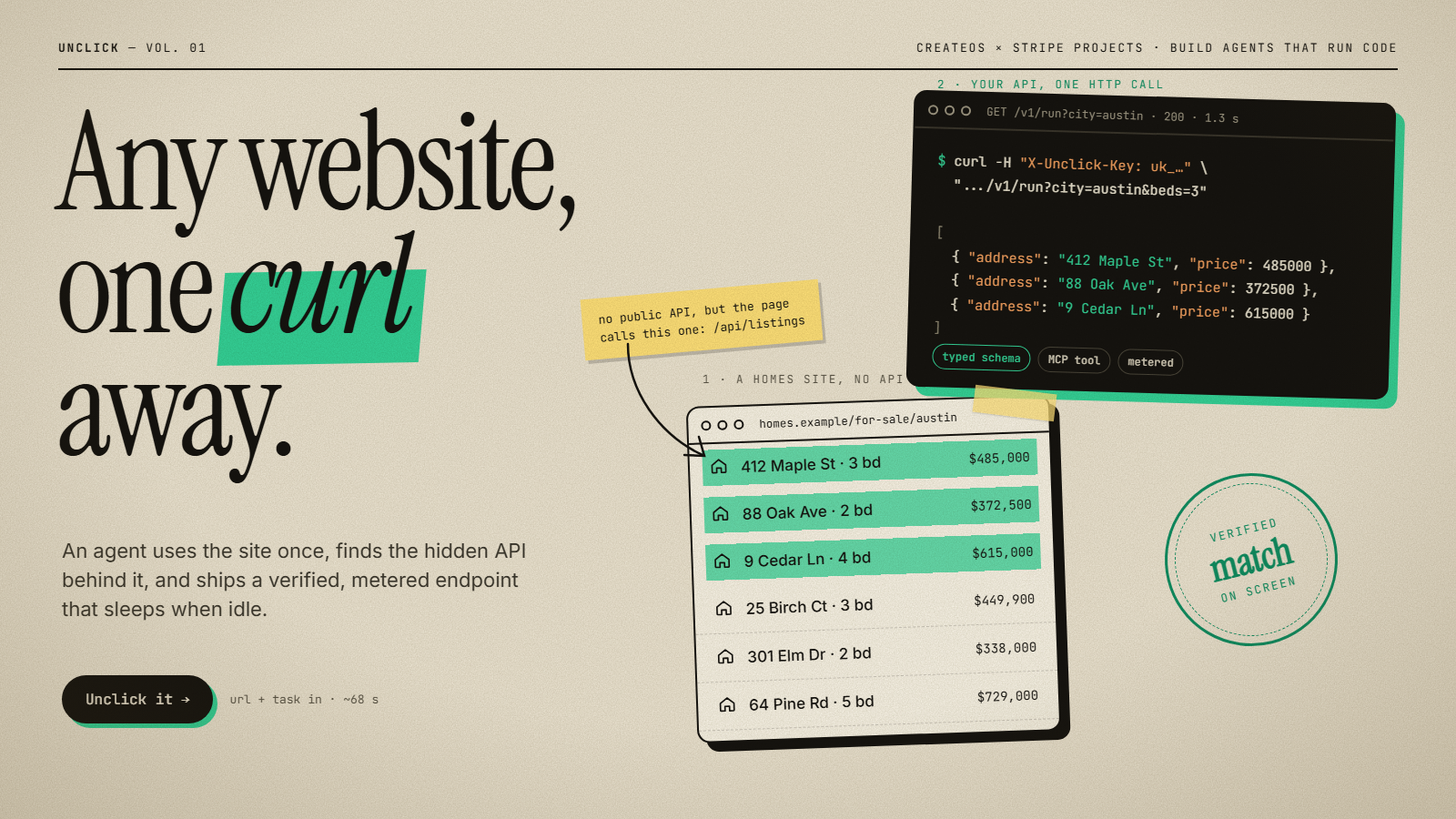
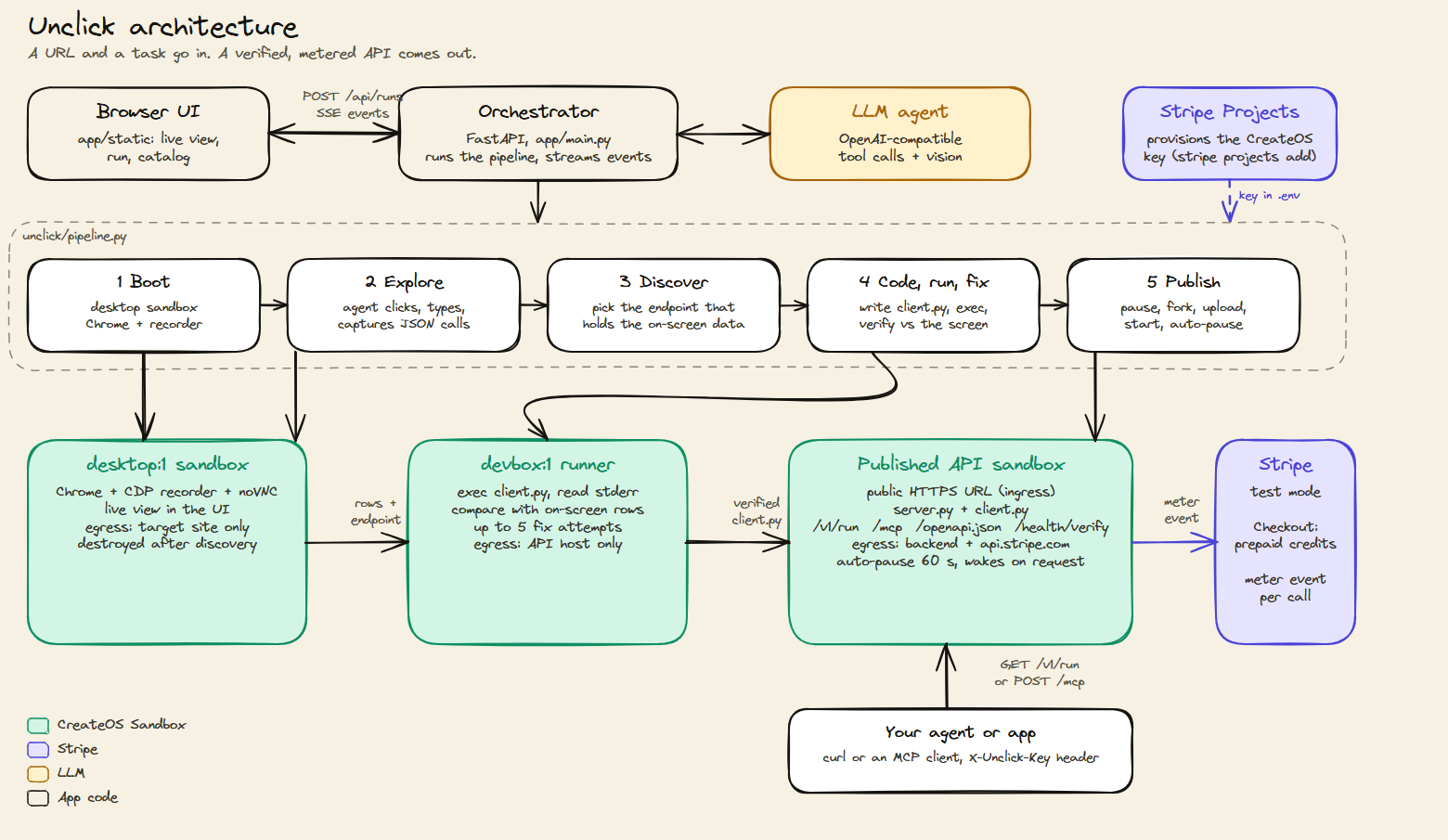
An AI agent drives Chrome in a CreateOS desktop sandbox, captures the site's hidden JSON API, writes and fixes a Python client until it matches the screen, then ships it as a paid, auto-pausing API with a typed schema and an MCP endpoint.
How I made it Built in about 5 hours by orchestrating a team of AI coding agents in parallel. I wrote a plan and a shared "contracts" file (interfaces plus event schema) first, then gave each agent exclusive ownership of its files: sandbox client, agent loop, publishing + billing, web UI. Agents built against fakes until the real pieces landed, and one orchestrator tested and merged a PR per agent. 28 PRs by the end.
How it works The agent opens the site in a real Chrome inside an isolated sandbox, records the page's network traffic, picks the hidden JSON endpoint behind the data, writes a Python client, runs it, and fixes it until the output matches what was on screen. Then it publishes a typed API with real parameters (page, filters), an OpenAPI schema and an MCP endpoint, billed per call.
What I learned • "Verify against the screen" is the whole game. Without a ground-truth check, agents happily ship clients that return plausible but wrong data. • Network allowlists make the best demo moment: the sandbox starts locked to one site, and you watch it unlock exactly one new host when the agent finds the hidden backend. • Running agents in parallel only works with strict file ownership and a contracts file. Without them they overwrite each other within minutes.
What surprised me • Most "no API" sites actually have a clean JSON API one click away. Some only fire it when you touch a filter, so the agent has to interact, not just load the page. • Infrastructure limits, not the AI, were the real bottleneck: daily sandbox quotas, concurrency caps, and deleted VMs still counting for a few seconds. • One run takes ~70 s with a browser + LLM, and every call after that is ~1 s with neither.
Tech stack
- Claude (Opus 5.5)
- Vercel
Links
Prompt steps
Step 1
5 Prompts I Actually Use to Ship AI Products Fast


1. Parallel Agent Brief With File Ownership

Prompt:
You own the sandbox layer for Unclick, an app that turns any website into an API.
Read docs/PLAN.md and unclick/contracts.py first. contracts.py is the source of truth: implement the Sandbox and Desktop protocols exactly (method names, signatures, event fields).
Build (only these files: unclick/sandbox.py, unclick/desktop.py, unclick/sandbox_assets/*, scripts/smoke_*.py):
1. sandbox.py: a sync httpx REST client with create, exec, files, egress, ingress, pause/resume, fork and destroy. Retry on 429/503 with backoff.
2. desktop.py: boot a desktop image with Chrome and a CDP network recorder that logs every JSON response to /tmp/captures.jsonl.
3. scripts/smoke_sandbox.py: create, exec, egress block/allow, public URL, pause, fork, destroy (always in finally).
Until agent.py (owned by another agent) exists, test against unclick/fakes.py.
Rules: don't edit files you don't own. If contracts.py needs a change, make it additive only and say so. Don't commit, don't switch branches, don't touch .env. If the API key is missing, build from the docs and report exactly what's untested. Time box: 90 minutes.
Final report: files created, what's verified live vs untested, real findings (limits hit, undocumented behaviour), and a usage snippet for the other agents.

What it produces:
Four agents build one app at the same time in the same folder without overwriting each other. Each hands back a report I can test and merge as a PR in minutes.

Why it works:
Exclusive file ownership means no two agents edit the same file. A shared contracts file settles every interface before any code exists. Testing against fakes until the real piece exists means no agent waits on another. The "verified live vs untested" report tells the integrator what to trust. The "real findings" line pulls out surprises like rate limits that would otherwise stay inside one agent's context.

When to use it:
Splitting a product into 3 to 5 agents running in parallel. Agents sharing one checkout with no worktrees. Any build where one layer (an API client) blocks the others.

Surrounding system:
Before sending it, I write docs/PLAN.md (architecture, a file-ownership table, a timeline) and unclick/contracts.py (interfaces plus an EventSink listing every event kind and its fields). One orchestrator agent owns git: it tests each report, then opens and merges one PR per agent.

Example:
Input: the brief above, sent to the publish + billing agent with its own file list.
Output: "Built and tested with billing mocked: 58/58 offline checks pass. Files: billing.py, api_template/server.py, smoke_publish.py. Live: publish works, auto-pause after 61 s, wake in 5.9 s. Untested: live billing (no test key). Integrator: billing.router mounts at /api/billing."


2. Research Fan-Out With Verified Links Only

Prompt:
Find real projects I could build or remix for a one-day build around "AI agents that write and run their own code in sandboxes", and return LINKS.
Use Exa (web_search_exa, web_fetch_exa) as the primary search engine. Spawn 4 subagents in parallel, one per source, each returning only verified links with 1 to 2 line summaries:
1. GitHub repos: open-source agents that execute their own code in sandboxes or microVMs (code interpreters, self-debugging agents, SWE agents, computer-use agents). Prefer stars and recent activity; note the license.
2. Past hackathon winners: Devpost, ETHGlobal, lablab.ai and MLH winners involving agents running code, sandboxes or computer use.
3. Startups: YC launches and Product Hunt products whose core is an agent that writes and runs code, small enough to rebuild a mini version in 5 hours.
4. Payments angle: demos where agents pay or charge per run (per-call billing, HTTP 402 pay-per-call, agent wallets).
Then synthesize into docs/idea-research.md: a table per source (name, link, what it does, which sandbox features it would use: fork, network allowlist, public URL, pause/resume, desktop). Then "Top 5 build candidates": for each, the reference links, a one-paragraph pitch for a NEW project inspired by them, the real user and problem, the single demo moment, the features used, a 5-hour feasibility score from 1 to 5, and risks. Flag anything that needs more than 1 concurrent sandbox (free plan allows 1).
Only include links you actually fetched or the search returned. No invented URLs.
Final message: the top 5 with links, short.

What it produces:
A ranked shortlist of 5 build ideas, each backed by real prior art (repos, winners, YC companies), with a feasibility score and a demo moment already chosen.

Why it works:
One subagent per source stops one search loop from fixating on a single kind of result. "Only links you actually fetched" kills hallucinated URLs. Requiring a demo moment and a feasibility score turns research into a decision: you compare ideas on what you can build and show today, not on how cool they sound. The concurrency flag catches infrastructure limits before you commit.

When to use it:
Picking a hackathon or weekend-project idea under time pressure. Scouting prior art before pitching a feature. Building a competitive landscape with sources attached.

Example:
Input: the prompt above.
Output: "#5 Click Once, Ship an API: a computer-use agent does a task on a portal with no API, records the network calls, writes a client, and publishes it as an endpoint. Refs: Parse (YC), Skyvern (YC), e2b-dev/desktop. Demo moment: 60 s of live clicking, then curl returns JSON in under 1 s. Feasibility 2.5/5. Risk: computer use is slow on 1 vCPU." This became the product.


3. Product-Grade UX Pass on a Working Demo

Prompt:
You are a senior product designer and front-end engineer. Turn the Unclick demo screen into a product someone would pay for. Judge every screen by: "Does a first-time visitor understand what this is and what to do in 5 seconds?" Keep the API and event contract; work only in app/static. Time box: 35 minutes.
1. Information architecture: two top-level views in the nav, Studio (build an API) and My APIs (catalog), deep-linkable via ?view= and #run=.
2. Three states with progressive disclosure. Never show empty panels.
   Landing: headline plus a one-line explanation, ONE input group (URL plus "what do you want from this page?") and a primary CTA, 3 example chips that prefill, a 3-step "how it works", and proof numbers (68 s to build, about 1.3 s per call).
   Running: the live browser view (16:9) is the hero, a plain-English activity feed is the narrative, and side cards (sandboxes, network allowlist, billing) appear only when their first event arrives.
   Result: a real API page with a method badge, the URL with copy, a health badge, a price chip, curl/Python/JS/MCP tabs, a try-it playground generated from the OpenAPI schema, and a response viewer showing latency and "charged 1 call".
3. Responsive: at 1280 and above, main area plus right rail; from 768 to 1279, a single column; below 768, stacked with a compact "Step 4/7 · Code" pill and horizontally scrolling tabs. No horizontal page scroll. Body text at least 15px, tap targets at least 44px.
4. Usability: hover, focus and disabled states (disabled says why), skeletons instead of blanks, errors with Retry, "Copied" feedback, Enter submits, aria-live on the feed, prefers-reduced-motion, AA contrast, no layout shift.
5. Microcopy: plain verbs in the primary UI ("Watching the page", "Found the data source", "Writing code · attempt 2", "Checking it matches the screen", "Your API is live"). Sandbox ids and hosts go in the side cards.
6. Verify with real screenshots at 1920x1080, 1440x900, 1024x768, 768x1024 and 390x844, through all three states. Fix anything cramped or confusing. Report one line per breakpoint.

What it produces:
A cluttered "every panel at once" dashboard becomes a clean landing, running and result flow that works from phone to desktop.

Why it works:
The 5-second test gives the model one ruthless criterion instead of "make it nicer". "Never show empty panels" plus "cards appear when their first event arrives" is the non-obvious trick: the page builds itself as the agent works instead of showing a wall of placeholders. Exact breakpoints plus mandatory screenshots force real verification instead of "looks responsive".

When to use it:
An AI-built demo UI that works but looks like an admin panel. Right before recording a product video. Any real-time or agent UI that streams events.

Example:
Input: the prompt above, sent to the UI agent.
Output: a serif hero ("Unclick any website. Into an API.") with HN search, crates.io and leaderboard chips, then a running view where feed rows go from spinner to check, then an API page with a try-it form for q and page. Verified at 5 breakpoints with no horizontal scroll.


4. Borrow a Site's Look, Not Its Identity

Prompt:
Step 1 (inspect): open https://getfairly.app/ in the browser and run JavaScript that collects computed styles for body, h1 to h3, p, button, input and nav (font family, size, weight, color, background, radius, shadow), the 16 most common colors across all elements, the unique font families, and the non-default transition timing functions and durations.
Step 2 (brief): turn the results into a design brief for the Unclick UI.
Theme (light or dark), background, ink, secondary text, hairline and border colors, ONE accent color and where it's allowed.
Type: heading font (if commercial, name a free Google Fonts substitute), UI font, mono font, weights, leading.
Components: nav style, card radius and shadow, and any signature pattern worth adapting (describe the pattern, don't copy its content).
Motion: easing curves and durations for reveals vs hovers, and which moments animate.
Put every token in app/static/theme.css as CSS variables.
Take the visual language only. Do NOT copy their name, logo, copy text, images or code.

What it produces:
An exact token-level design brief (hex values, font pairings, easing curves) that a coding agent applies in one pass, instead of "make it look like that site".

Why it works:
Computed styles give facts; from screenshots, models guess colors and fonts and get them wrong. Colour counting separates the real palette from one-off colours. Capturing transition curves gets the "feel", the hardest thing to describe in words. The free-font substitute and the "visual language only" rule avoid licensing and trademark problems while keeping the look.

When to use it:
"Make our app look like a site I admire." A fast rebrand of a prototype before launch. Giving a design agent concrete tokens instead of mood words.

Example:
Input: the prompt above.
Output: "Light, warm editorial. Background #F9F8F5, ink #120C08, secondary #666666 and #72716D, hairlines rgba(227,221,207,0.4), one accent #FF740A for live and active states only. Headings: ABC Marist (commercial), so use Instrument Serif light. UI in DM Sans, code in DM Mono. Frosted pill nav, 20 to 24 px card radius. Reveals cubic-bezier(0.22,1,0.36,1) at 1 s, hovers cubic-bezier(0,0,0.2,1) at 150 to 300 ms."


5. Timed Facecam Demo Script With Screen Cues

Prompt:
Write a 3-minute demo video script for Unclick ("give it any website, get back a real API, built by an agent that writes and runs its own code"). Ananya is on facecam the whole time; the screen shows the Unclick app at localhost:8082 doing a live run on https://hn.algolia.com/?q=ai.
Structure, with timestamps:
0:00 Hook (15 s): who she is and the product in one sentence with the payoff ("an API in about a minute").
Problem (30 s): the 3 ways people get website data today (copy-paste, brittle scrapers, browser agents that re-click every time) and why each hurts, then the insight that most sites already load data from a hidden JSON API.
Solution (10 s): what Unclick does, in one breath.
Live end-to-end run (about 80 s): one line she says per phase while it happens (boot, network allowlist, finding the data source, writing and checking code, publish), each tied to something visible on screen.
Result (30 s): in Try it, change q to "stripe" and send (show about 1 s and "charged 1 call"), then the MCP tab and My APIs.
Close (15 s): the stack in one sentence each, then the tagline "Do it once, call it forever."
For every beat give Screen (what's showing or what to click) and Say (the exact line). Write for speaking: short sentences, no jargon. Add a recording checklist: setup (1920x1080, 100% zoom, notifications off), a fallback if the live run fails (replay a recorded real run), where to upload, and how to check the link works in incognito.

What it produces:
A shootable script where every spoken line is matched to a screen action and a timestamp, so the presenter never ad-libs over dead air.

Why it works:
Pairing Screen and Say for every beat is the trick: it forces narration to match what's actually happening, which is where most demo videos fall apart. "One line per phase while it runs" turns a 70 to 110 second loading wait into the strongest part of the story. The fallback in the checklist (replay a real recorded run) protects a one-take recording. "3 ways people do it today" sets up the payoff without a long intro.

When to use it:
Launch or demo-day videos with a required on-camera presenter. Product walkthroughs where a live process takes a while. Sales demos you record once and reuse.

Example:
Input: the prompt above.
Output (excerpt):
0:55 to 2:15, Live run. Screen: HN search prefilled, click "Unclick it".
Boot: "This spins up an isolated micro-VM with Chrome inside. You're watching it live."
Allowlist: "The sandbox can only reach this one site. Everything else is blocked."
Discover: "It found the real data source, and the allowlist grows by exactly that one host."
Code and verify: "Now it writes its own Python client, runs it, and checks it against the screen. If it fails, it fixes itself."
Step 2
https://github.com/somewherelostt/unclick

check out our github
2 likes · 1 comment · 4 views
Comments (1)
Nice Read!