Aesthetic
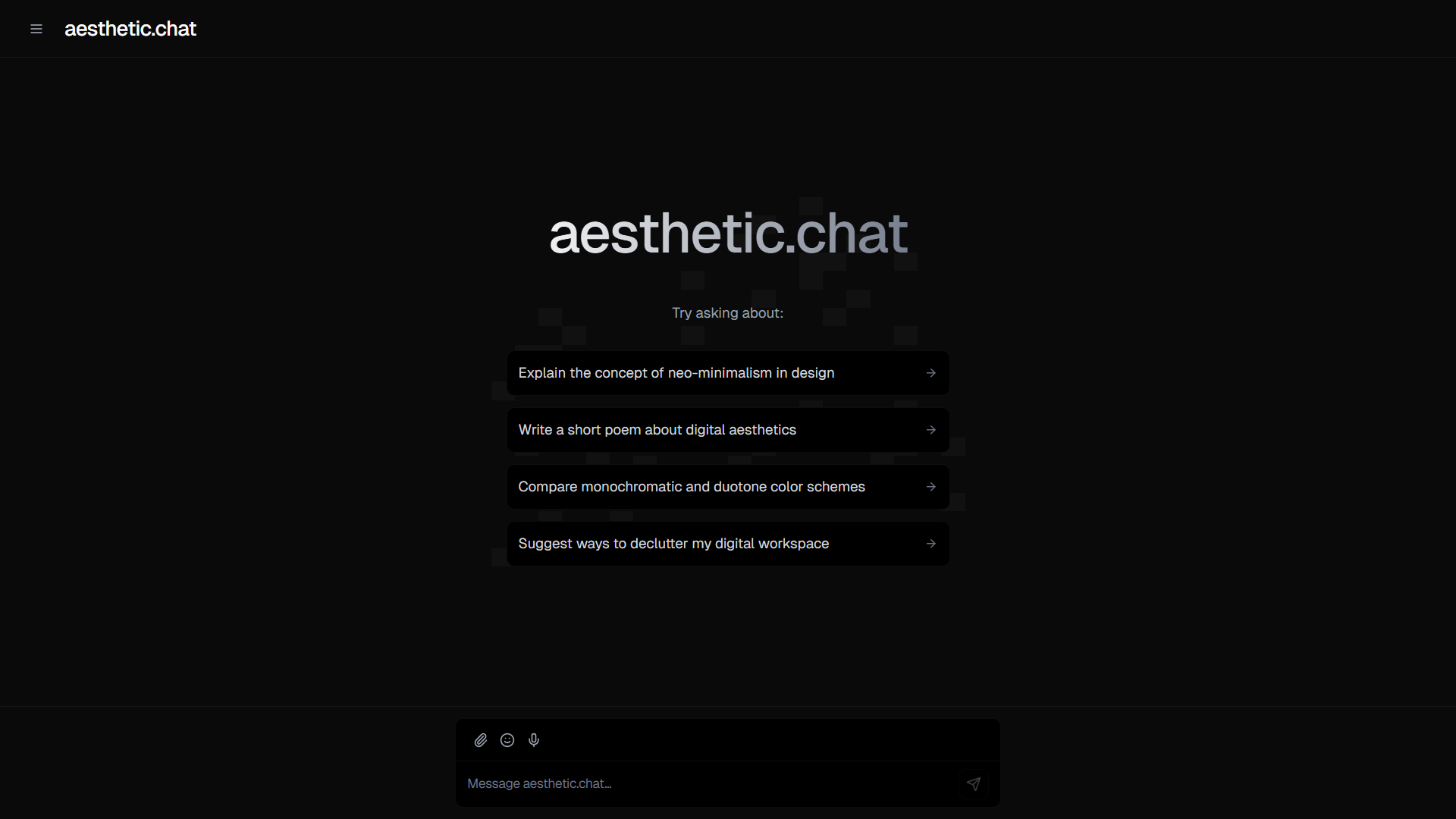
Aesthetic.chat began as a personal experiment, an independent developer from Costa Rica.
While experimenting with Vercel's v0 AI builder, he generated a minimalist chatbot interface and continued refining the design through Cursor.
After sharing his work online and receiving positive feedback, he decided to make the project open source and publish a public Vercel demo.
The project demonstrates how AI coding tools can help an independent developer move from a design experiment to a polished, shareable interface.
Tech stack
- Claude
- ChatGPT
- Google AI Studio
Links
Prompt
PROJECT: AESTHETIC AI — THE MINIMALIST INTELLIGENT CHAT WORKSPACE

Project Vision

Build an exceptionally polished, minimalist AI chat application that combines the intelligence of modern language models with a beautiful, calm and highly functional user interface.

The central objective is to create a conversational workspace that feels thoughtfully designed rather than resembling a generic chatbot template.

Every interaction should feel effortless, every visual element should have a clear purpose, and the overall experience should prioritize readability, speed and creative focus.

Develop an original application using Vercel v0 for AI-assisted interface generation and Cursor for implementation, refinement and debugging.

The product should be achievable by an independent developer while demonstrating professional attention to both design and functionality.

1. Distinctive Minimalist Interface

Create a sophisticated dark-mode chat interface inspired by contemporary editorial design and minimalist software.

Use an almost-black background, charcoal surfaces, subtle borders, carefully controlled shadows and bright neutral typography.

Avoid colorful gradients, oversized decorative cards, unnecessary illustrations and excessive animation.

Use a consistent spacing system and refined typography.

The interface should feel premium, technical, calm and distraction-free.

Create an original visual identity instead of directly reproducing the branding or interface of an existing chat product.

2. Beautiful Welcome Screen

Design a centered welcome experience with a large, elegantly styled product name.

Include a short introductory line encouraging users to begin a conversation.

Underneath the heading, show several carefully designed suggested prompts.

Example suggestions:

- Explain a complex idea in simple language.
- Help me brainstorm a creative project.
- Compare two technical approaches.
- Improve the clarity of my writing.
- Generate ideas for an original website.

Make each suggestion interactive.

When selected, it should populate or submit the corresponding prompt.

Provide subtle hover effects and immediate visual feedback.

3. Intelligent Conversation Workspace

Build a fully interactive messaging interface.

Support messages from users and AI assistants.

Display messages in a clean, readable layout with appropriate spacing and typography.

Include support for Markdown, syntax-highlighted code blocks, lists, tables and links.

Preserve formatting across different screen sizes.

Provide actions for copying responses, regenerating answers, editing previous prompts and continuing a conversation.

Automatically scroll to new messages while allowing users to read earlier responses without interruption.

4. Advanced Chat Composer

Create a refined message composer fixed near the bottom of the conversation workspace.

Use a compact rounded container with subtle borders and appropriate padding.

Include:

- Expandable multiline text input.
- Send button.
- Attachment control.
- Selected AI model indicator.
- Keyboard shortcut support.
- Loading and cancellation states.

Support Enter to send and Shift+Enter for a new line.

Disable submission when the input is empty.

Maintain good keyboard accessibility.

Ensure the composer remains properly positioned on mobile devices when the keyboard opens.

5. Real AI Integration

Integrate Anthropic Claude or another supported language model through a secure backend.

Use a server-side API route to handle chat requests.

Implement response streaming so users can see generated text appear progressively.

Maintain conversation context across messages.

Store provider API credentials securely.

Handle model errors, rate limits, network interruptions and cancelled requests.

Distinguish actual AI-generated responses from demonstration content.

The system should never simulate a successful model response when a real API call has failed.

6. Model Selection

Create a compact model-selection interface.

Support available language models through a provider adapter architecture.
Display each model's name and relevant capabilities.

Allow users to switch models before sending a message.

Store model selection with each message so conversation history accurately represents which system generated each response.

Only enable models with valid provider configurations.

Avoid promising model capabilities that are unavailable through the connected API.

7. Conversation Sidebar

Design a compact, collapsible navigation sidebar.

Include sections for:

- New Chat.
- Recent Conversations.
- Favorites.
- Search History.
- Settings.
- Profile.

Display conversation titles in a neat vertical list.

Allow users to rename, favorite, delete and revisit conversations.

Support automatic conversation titles generated from the initial topic.

Use subtle separators and active-state indicators.

The sidebar should be responsive and collapse into a mobile navigation drawer on smaller devices.

8. Persistent Conversation History

Implement secure conversation persistence.

Store conversations and individual messages in a structured database.

Each conversation should contain a title, creation timestamp, most recent activity timestamp and selected model.

Each message should contain its role, content, model identifier and timestamp.

Allow users to return to previous conversations without losing their history.

Implement appropriate access controls to prevent unauthorized retrieval.

Provide options for deleting individual conversations and clearing history.

9. Conversational Search

Add a search interface for finding previous conversations.

Allow users to search by title, keywords and message content.

Highlight matching results.

Provide keyboard navigation and quick access to selected conversations.

Optimize queries for responsiveness.

Keep search results restricted to the authenticated user's own information.

10. File Attachments

Allow users to attach supported documents and images.

Implement secure upload validation and size limits.

Display attachment previews inside the composer.

For supported vision models, allow images to be included in chat requests.

For documents, extract text through a reliable parsing pipeline.

Do not claim to support a file format unless its actual processing workflow is implemented.

Provide controls for removing attachments before sending.

11. AI Writing and Coding Assistance

Optimize the application for several practical workflows.

Writing: Drafting, rewriting, summarizing and improving text.

Programming: Explaining code, generating examples, troubleshooting and reviewing snippets.

Learning: Providing structured explanations and guided problem solving.

Brainstorming: Exploring creative ideas and developing project concepts.

Research Assistance: Organizing user-provided information and creating structured summaries.

Provide suggested prompts tailored to these workflows.

Keep all functionality accessible through the main chat interface.

12. Refined Response Interactions

Develop elegant interaction controls for AI messages.

Include Copy, Regenerate, Continue and Edit Prompt actions.

Make controls appear contextually without distracting from the response.

Provide visual confirmation when content is copied.

Allow users to compare regenerated responses.

Preserve earlier versions where appropriate.

Add a user-controlled stop-generation button for streamed responses.

13. Theme and Appearance Settings

Create a compact settings panel.

Allow users to customize:

- Dark and light modes.
- Interface density.
- Font size.
- Code block appearance.
- Reduced motion.
- Conversation display preferences.

Save settings locally or to the authenticated user profile.

Ensure color contrast remains accessible across supported themes.

Do not allow visual customization to break the interface hierarchy.

14. Responsive Mobile Experience

Optimize the chat application for phones and tablets.

Collapse the sidebar into an accessible navigation drawer.

Make the message composer touch-friendly.

Ensure long responses, tables and code blocks remain readable.
Support horizontal scrolling inside wide code blocks without causing the entire page to overflow.

Provide comfortable spacing around interactive controls.

Test the application across common desktop and mobile viewports.

15. Authentication and Privacy

Implement optional authentication using a suitable provider.

Allow a limited guest demo when appropriate.

Use secure sessions and server-side validation.

Protect stored conversation history.

Provide clear privacy settings and deletion controls.

Avoid unnecessarily retaining uploaded files.

Never expose API keys or confidential user information in client-side code.

Implement reasonable usage limits to prevent uncontrolled AI API spending.

16. Technical Architecture

Use Vercel v0 as the initial AI-assisted development environment.

Use Cursor for iterative implementation and code refinement.

Build the application with Next.js, React and TypeScript.

Use Tailwind CSS for custom styling.

Use a suitable component system such as shadcn/ui, customized to support the application's original design language.

Use the Vercel AI SDK for streaming language-model interactions.

Use PostgreSQL for conversation persistence.

Implement authentication through a supported provider.

Use Zod for request and response validation.

Deploy the finished application on Vercel.

These are proposed implementation choices for an enhanced version of the concept, not a claim that every feature exists in the original project.

17. Design Quality and Performance

Prioritize excellent perceived performance.

Use lightweight animations and avoid unnecessary client-side rendering.

Keep the main interface responsive during long model responses.

Use skeleton states only where useful.

Maintain a consistent design system for spacing, typography, borders and component interactions.

Test accessibility, keyboard navigation, focus states and screen-reader labels.

Avoid flashy effects that interfere with readability.

18. Functional Testing

Test the complete chat workflow.

Verify that users can:

- Start a new conversation.
- Submit a prompt.
- Receive a streamed response.
- Stop generation.
- Copy an answer.
- Regenerate a response.
- Access conversation history.
- Switch between available models.
- Upload supported attachments.
- Use the application on mobile devices.

Test failure states including unavailable AI providers, invalid attachments and interrupted network connections.

Do not describe the product as fully functional until its principal workflows operate correctly.

19. Final Deliverables

Build a production-ready minimalist AI chat application containing:

- Original dark-mode interface.
- Elegant welcome screen.
- Interactive prompt suggestions.
- Functional chat composer.
- Real AI model integration.
- Streaming responses.
- Collapsible navigation sidebar.
- Persistent conversation history.
- Search and favorites.
- Model selection.
- File attachments.
- Response actions.
- Theme settings.
- Responsive mobile layouts.
- Secure backend integration.

Include clean source code, environment configuration, setup documentation and Vercel deployment instructions.

Core Philosophy: The best AI interface is not the loudest. It is the one that makes thinking feel effortless.
1 like