Built RepairRoute, a mobile web app on Base44 that connects tenants, landlords, and vendors to handle home repairs. It's live at landlordssquare.base44.app. When something breaks, the app works out how urgent it is and gets the right vendor on the job.
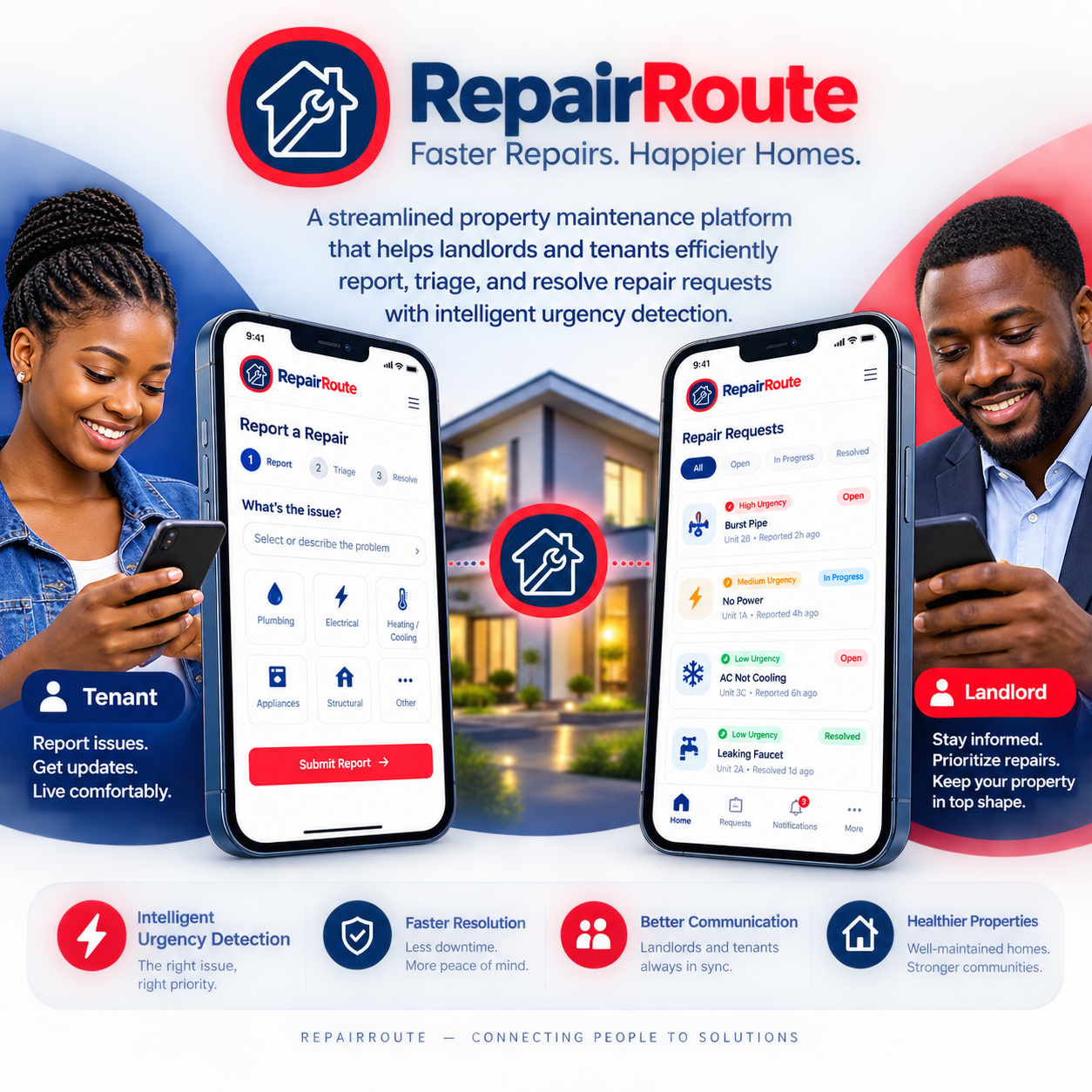
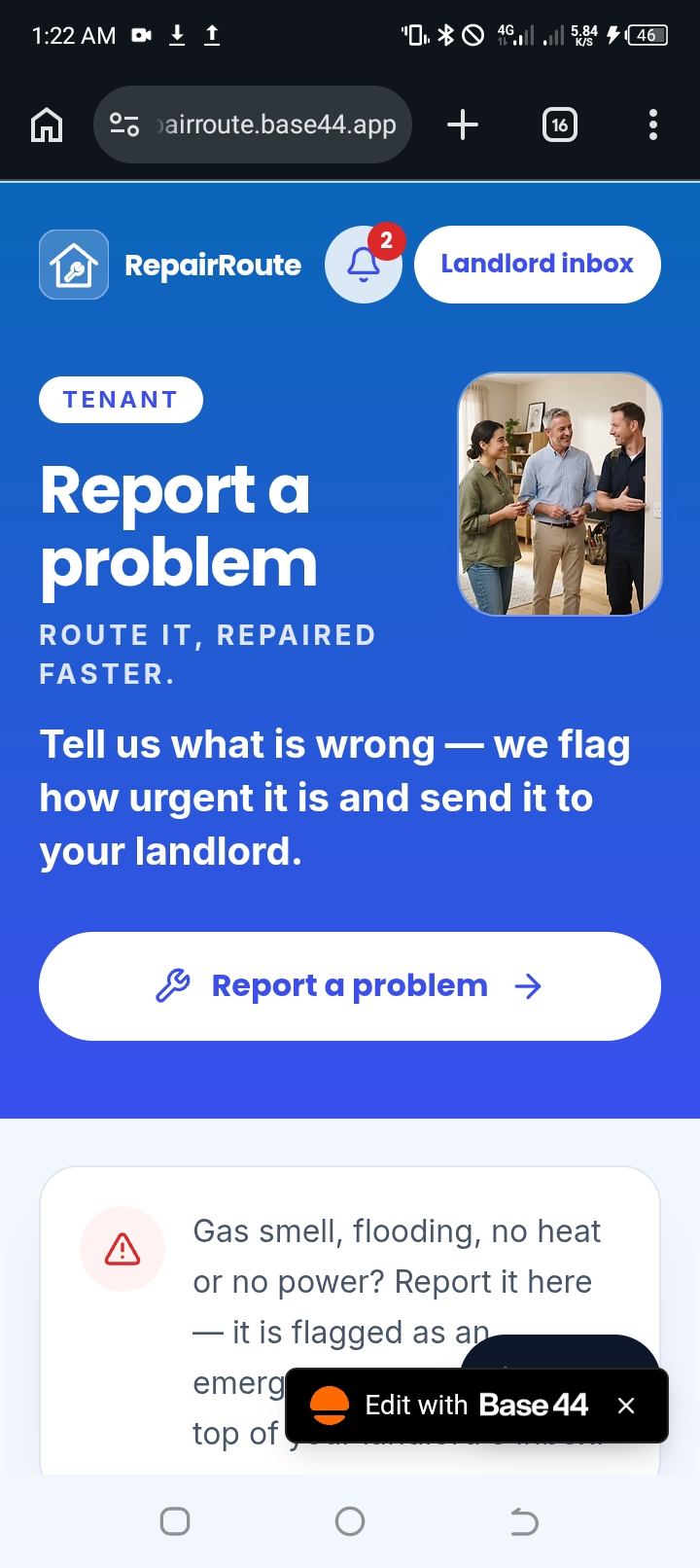
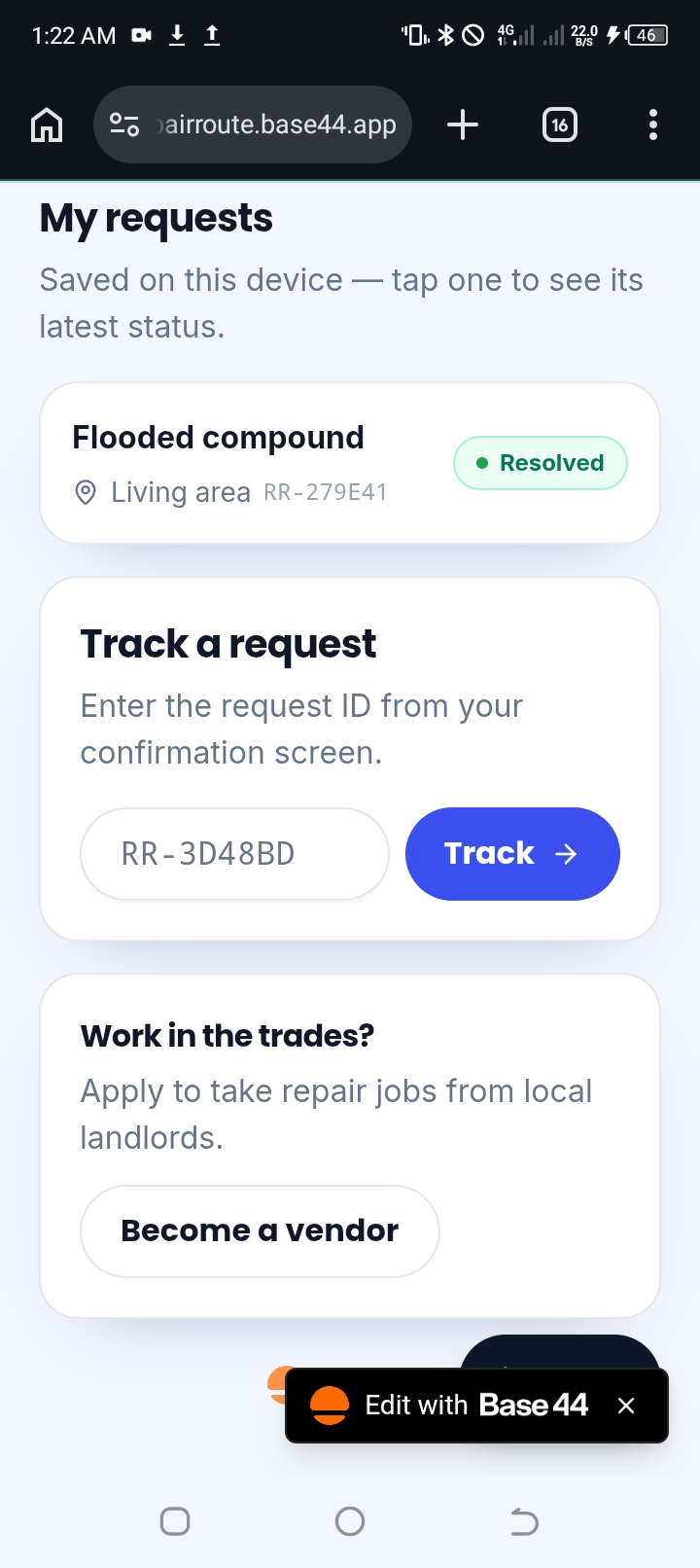
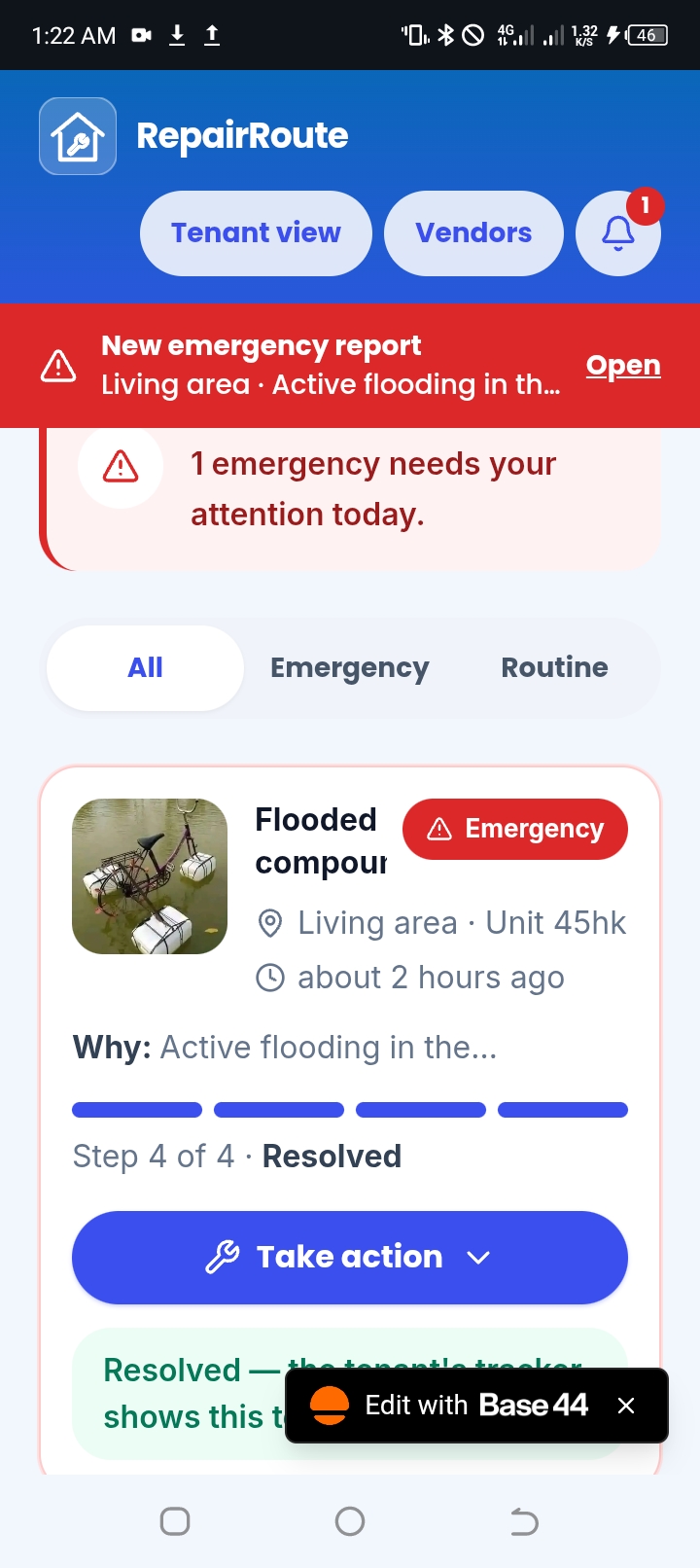
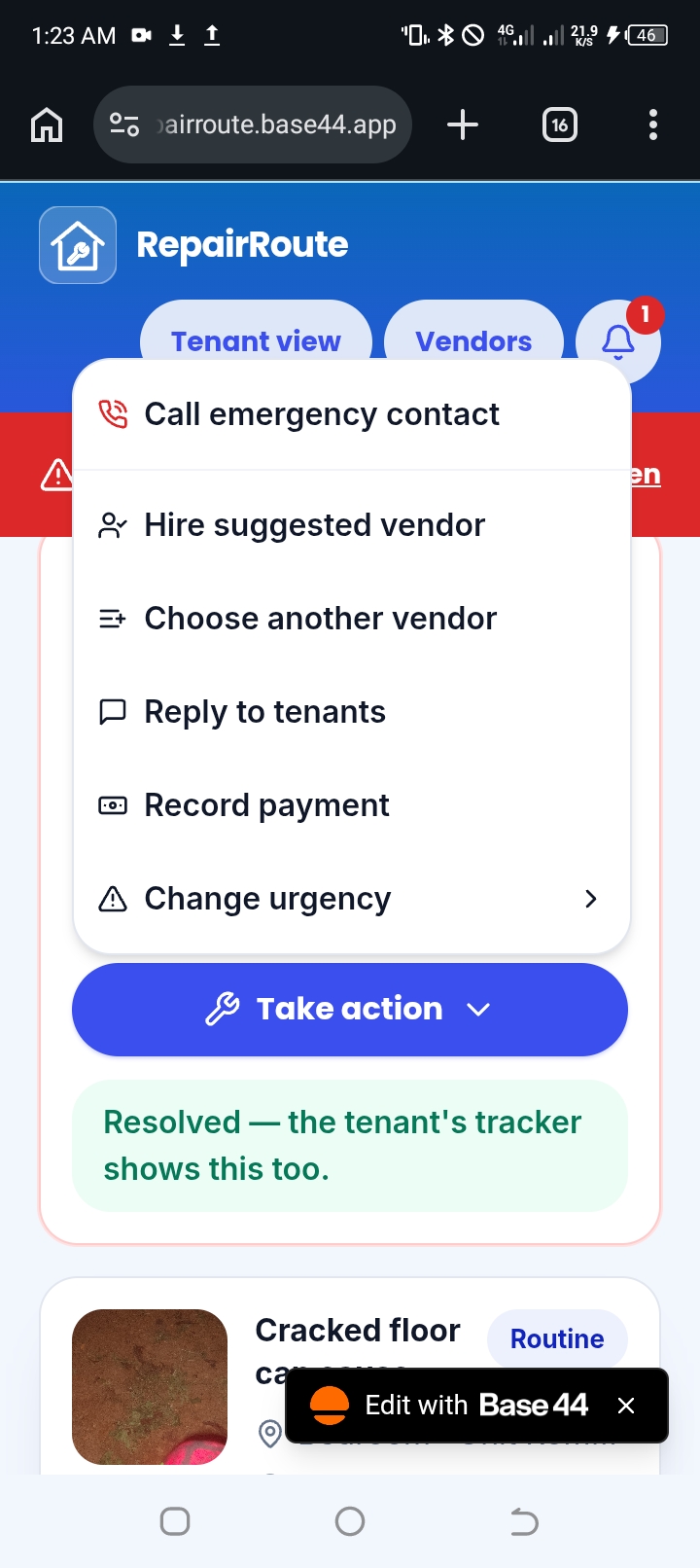
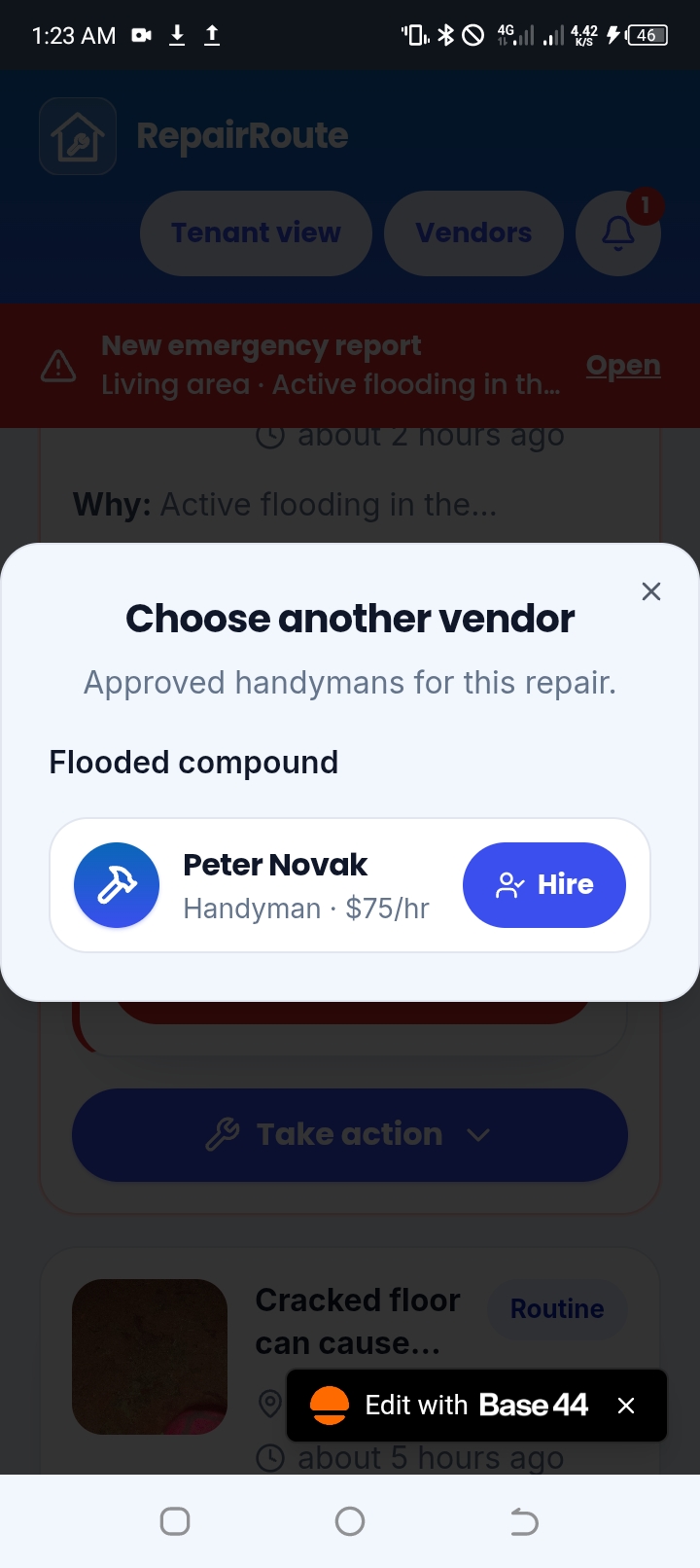
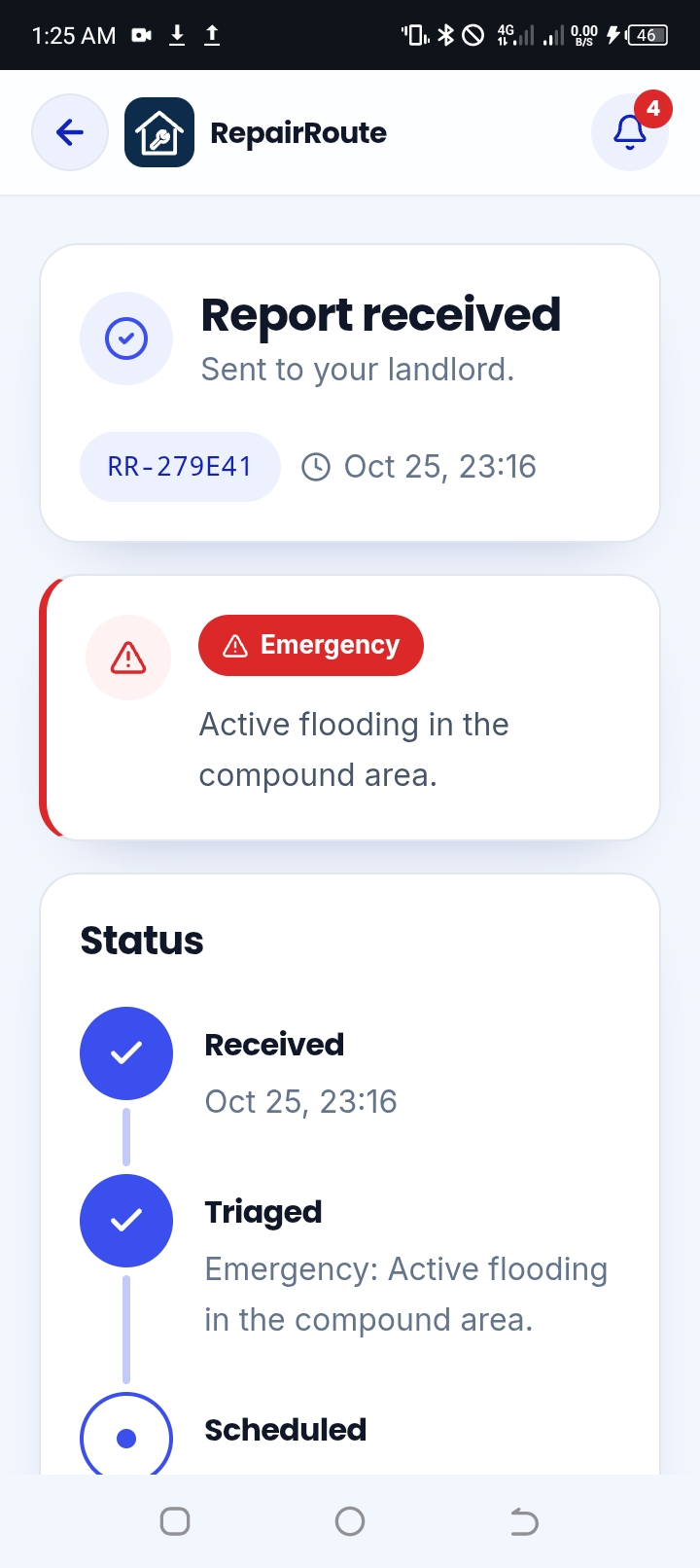
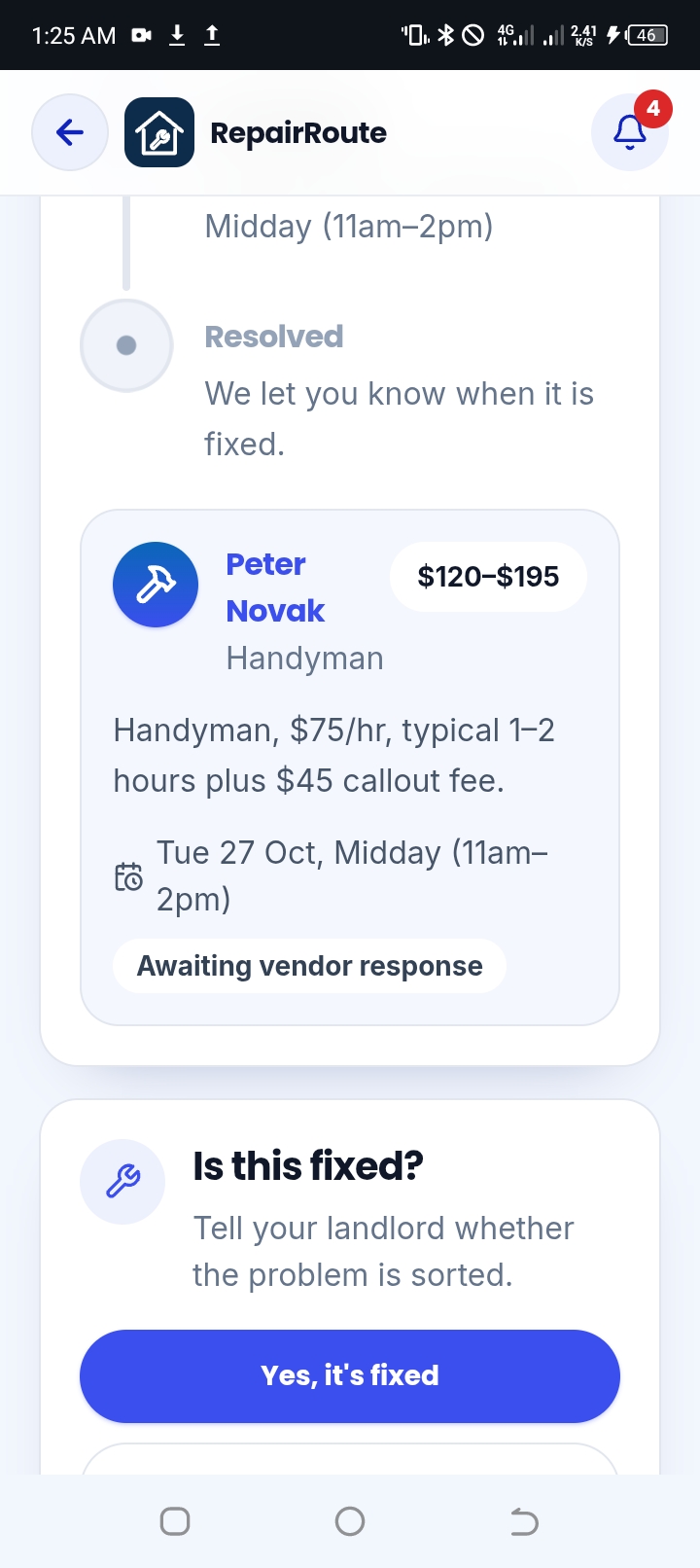
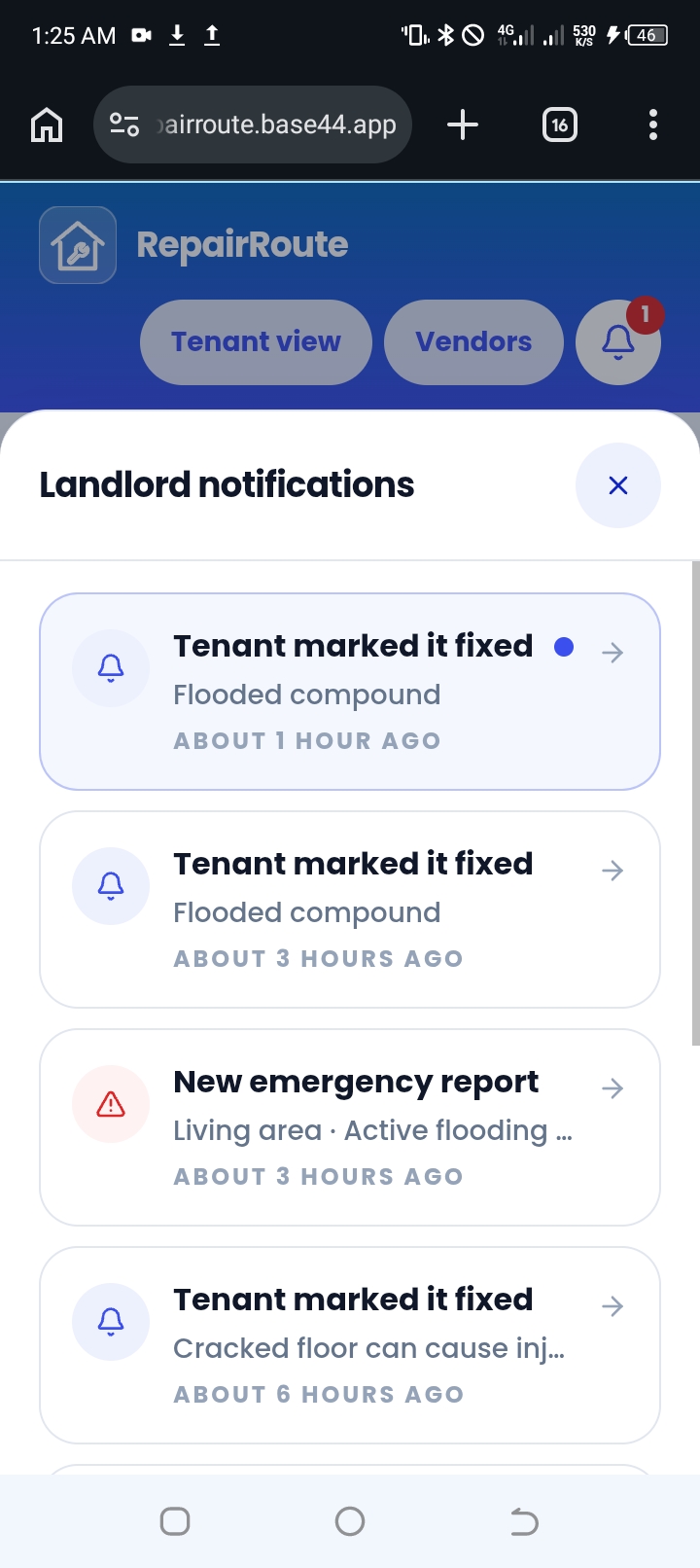
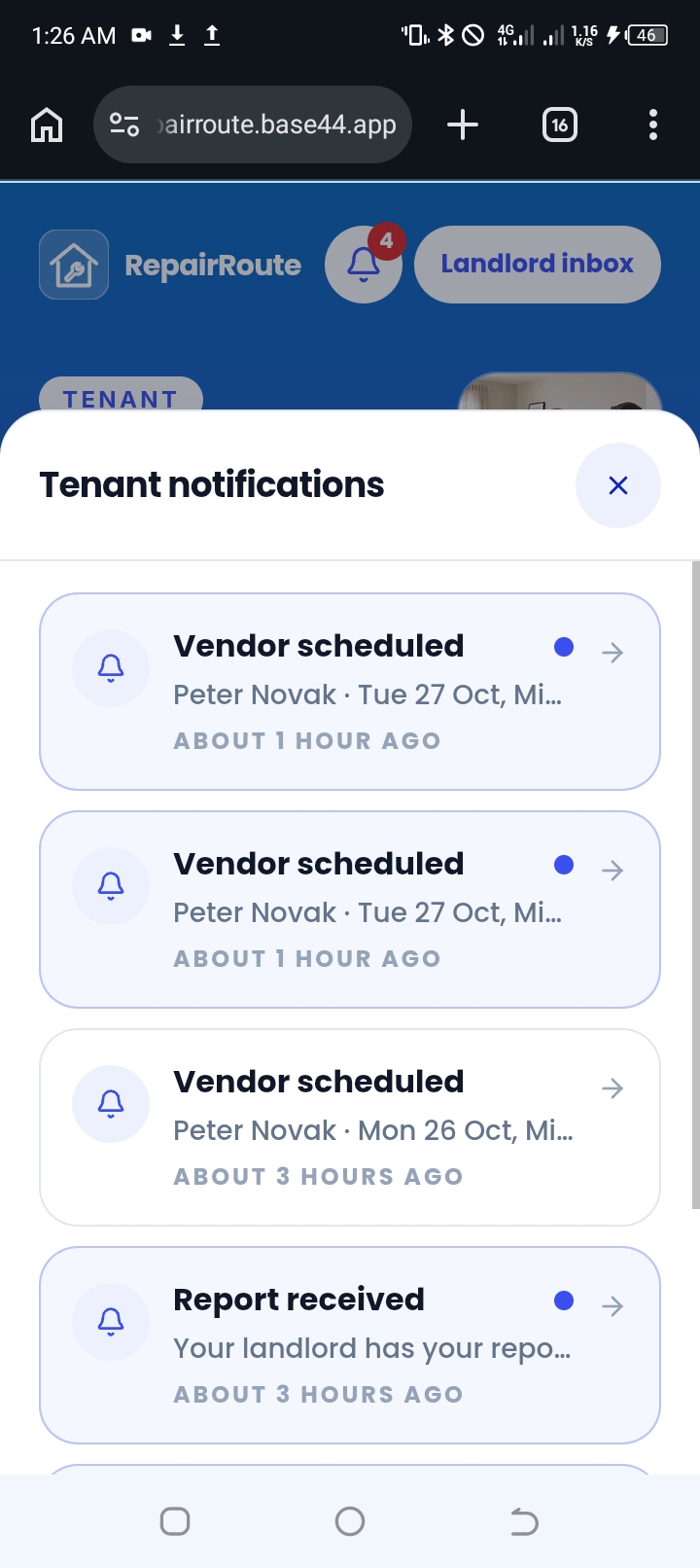
RepairRouteRepairs Routed by Urgency, From Report to Fixed. Problem: Most landlords don't live next door to their tenants. When a pipe bursts at 2 a.m. and a kitchen floods, the tenant has to reach someone who may be hours or countries away, and hope the message gets read. A flood and a loose cabinet hinge land in the same pile of texts and calls. Nobody knows what to handle first, vendors are found in a scramble, and tenants are left wondering whether anyone is coming. The solution: RepairRoute connects tenants, landlords, and vendors in one flow. A tenant reports a problem with a photo and a short description. The app checks the urgency immediately, tells the landlord why, and routes the job to the right kind of vendor. The tenant can follow each step until the repair is confirmed fixed. How it works💯 Tenants: No signup or login. The device is recognized automatically. Report a problem with a photo, a one-line description, and a location in the unit. Each report gets a request ID, an urgency label, and a four-step tracker: Received, Triaged, Scheduled, Resolved. The tenant confirms when the repair is fixed, so the person living with the problem has the final say. Landlords: A triage inbox sorts emergencies first, with a red banner and a count of emergencies needing attention. Every card shows the photo, the urgency, the reason ("Active flooding on property premises"), the location, and the time. Routine jobs get a suggested vendor, an estimate range based on the vendor's rate, and a one-line reason. The landlord can hire the suggested vendor, choose another, message the tenant, or change the urgency. Emergencies skip vendor matching and show a "Call emergency contact" action. Vendors: Vendors apply through a "Become a vendor" form with their trade, rate, callout fee, and service area. Only approved vendors appear in routing. The creator reviews applications from a private admin page. Approved vendors receive job offers and can accept or decline with a proposed time. Payments (demo): will be fully integrated soon. Notifications: Each role has its own bell and unread count, and sees only its own alerts. My process🧠 : I built RepairRoute in steps, testing after each one: Idea selection. I started with several ideas, including voice-first apps, document tools, and caregiver handoffs, and chose tenant repair triage because it has a clear user, a clear before-and-after, and several automated decisions. Core build. I wrote the first Base44 prompt for the tenant report form and the landlord inbox with urgency classification. Vendor routing and tracking. I added the vendor list, estimates, approval, and the four-step tracker for both sides. Testing like a user. I submitted real test reports and found problems: landlord replies didn't reach tenants, tenants had no way to find their requests, and some buttons didn't respond. Full audit. I asked Base44 to audit the whole app without changing anything. It found that triage ran too late, demo data wasn't linked to devices, white text on the gradient was low in contrast, and the logo was unclear at small sizes. I fixed each issue with its own prompt and retested. Design and branding. I moved from a plain default look to a blue gradient, pill buttons, rounded cards, clear urgency colors, a route-line logo, and restrained motion that respects reduced-motion settings. Vendor approval and payments. I added the vendor application and approval flow, then the tenant-confirmed completion and deposit flow. Design decisions✍️: Red only for emergencies, so urgency is visible at a glance. A visible reason for every classification, so landlords can trust the triage and override it. One route line as the brand idea: from tenant, through the landlord, to the vendor, ending in a check mark for "fixed." Mobile first, because tenants report problems from their phones, usually at the worst moment. Tenant confirmation before final payment, so a landlord isn't asked to pay for unfinished work. What I'd build next Real payment holding through a payment provider Background push, email, and SMS notifications Vendor ratings and a verified-documents check Multi-property and multi-landlord accounts Tenant history by unit, so landlords can see recurring problems Limits I'm upfront about Payments are a demo. Tenant recognition is per browser. Clearing browser data means a tenant has to look up a request by its ID. The admin page uses a passcode, which suits a demo but not a live product. Notifications currently work in-app.
Built with Base44 for the app, backend, and data. Work through on google drive. Every prompt, test, and fix was done by me, step by step.
Tech stack
- Base44
- Claude
Links
Prompt
Lot of prompts. But this is a summary:

1. Core build
Build a mobile-first web app called RepairRoute for small landlords and their tenants to report and triage repair requests.
Design direction: Clean, calm, and trustworthy. Use a neutral background, one strong accent color for primary actions, and red reserved only for emergencies. Large tap targets (at least 48px), readable type (16px minimum body text), and a layout that works on a 375px-wide phone screen first, then scales up to desktop.
Tenant page ("Report a problem"):
A large "Report a problem" button at the top.
A form with: a photo upload (camera or gallery), a short description text box with placeholder "Kitchen sink leaking under cabinet," and a dropdown for location in the unit (Kitchen, Bathroom, Bedroom, Living area, Other).
On submit, show a confirmation screen with the request ID and a status tracker with four steps: Received, Triaged, Scheduled, Resolved. Mark "Received" as complete.
Automation logic:
When a request is submitted, classify its urgency as Emergency or Routine based on the description, photo context, and location. Emergency triggers include water leaks near electrical outlets, active flooding, gas smell, no heat in winter, no electricity, sewage backup, and broken locks on exterior doors.
Store a one-line reason for each classification, such as "Water leak near electrical outlet."
Emergencies should appear at the top of the landlord inbox with a red label and a visible alert banner.
Landlord page ("Triage inbox"):
A list of requests sorted by urgency, emergencies first, then by submission time.
Each card shows the photo thumbnail, the urgency label, the one-line reason, the location, and the time submitted.
Each card has three actions: "Approve route," "Change urgency," and "Message tenant."
Include a simple filter for All, Emergency, and Routine.
Data: Use sample data for two properties with four tenants and six requests, so the demo shows both urgency levels immediately.
Requirements: Fully responsive, no login required for the demo, and a clean empty state when there are no requests.
Result: Tenants report a problem with a photo, and every report is labeled Emergency or Routine with a one-line reason. Emergencies jump to the top of the landlord inbox under a red banner.
2. Vendor routing and status tracker
Extend the RepairRoute app with vendor routing and a full status tracker. Keep the existing tenant report form, landlord triage inbox, and reply thread working. Don't change their design.
Vendors and routing (landlord side):
Add a "Vendors" section with sample vendors by trade: two plumbers, one electrician, one HVAC technician, and one general handyman. Each vendor has a name, trade, hourly rate, and typical callout fee.
For each Routine request in the inbox, show a "Suggested vendor" panel. Choose the vendor by matching the trade to the request. Keywords to match include: faucet, sink, toilet, pipe, drain → Plumber; outlet, light, switch, wiring, breaker → Electrician; heat, AC, thermostat, vent, furnace → HVAC; door, hinge, cabinet, shelf, window → Handyman.
Show a cost estimate range for the suggested vendor, calculated from their hourly rate and a typical job duration for that issue type. Show the reason for the estimate in one line, such as "Plumber, $95/hr, typical 1–2 hours plus callout fee."
The landlord can tap "Approve route" to send the job to the suggested vendor, or pick a different vendor from a dropdown before approving.
Emergency requests skip vendor matching and show a "Call emergency contact" action instead.
Status tracker (both sides):
Use four steps for every request: Received, Triaged, Scheduled, Resolved.
Approving a route moves the request to Scheduled and shows the vendor's name and a proposed time window.
Add a "Mark resolved" action for the landlord. Resolving updates the tenant's tracker automatically.
The tenant's status page should show the current step, the vendor name once assigned, and the estimate range.
Vendor job card:
A simple page per job showing the request details, photo, location, tenant's preferred time window, and cost estimate.
Vendor can "Accept" or "Decline" with a proposed time. Accepting moves the request to Scheduled.
Data: Use the existing sample requests. Add vendor assignments to at least two Routine requests so the demo shows routing on first load.
Requirements: Mobile-first, responsive, and the classification logic from the earlier build must still work for new requests.
Result: Routine repairs are matched to the right trade with a suggested vendor and a rate-based estimate. Approving a job moves it through a four-step tracker: Received, Triaged, Scheduled, Resolved.
3. Full audit
Audit the RepairRoute app end to end. Do not change any code, design, or data yet. Produce a status report only.
Test each flow on a mobile view (360px wide) and a desktop view. For each item, mark it Working, Partly working, Broken, or Not built, and describe what you observed in one or two sentences.
1. Tenant flow
Submit an emergency report with a photo. Is it classified as Emergency with a reason?
Submit a routine report without a photo. Does it still submit and classify?
Confirmation screen shows the request ID and a working "Track this request" button.
The tenant home shows "My requests" and lists the tenant's own requests only.
Entering a request ID in "Track a request" opens the correct status page.
Status page shows the current step, vendor name, estimate range, and time window after approval.
Status updates after the landlord acts, without a manual reload.
Landlord replies appear in the thread on the status page.
Tenant can send a reply back to the landlord.
2. Landlord flow
Inbox lists emergencies first, with the red banner and the count.
Filters for All, Emergency, and Routine work.
Each card shows photo, urgency label, reason, location, time, and the four-step tracker.
Routine cards show a suggested vendor, estimate range, and one-line reason.
"Approve route" moves the request to Scheduled and updates the tenant view.
Vendor dropdown changes the suggested vendor before approval.
"Change urgency" works and updates the reason and the tenant view.
"Message tenant" sends a message that reaches the tenant.
"Mark resolved" updates the tenant view.
Emergency cards show "Call emergency contact" and skip vendor matching.
3. Vendor flow
Vendors page lists approved vendors by trade, with rate and callout fee.
"Become a vendor" form submits and shows a confirmation with an ID.
New applications appear in the admin list immediately.
Auto-approve setting works: when on, the vendor appears in Vendors without manual action.
Approve and Reject work, and approved vendors appear in routing without a reload.
Vendor job card: Accept moves the job to Scheduled, and Decline asks for a proposed time.
Pending and rejected vendors never appear in routing or the dropdown.
4. Admin
Passcode gate works and is not linked from tenant or landlord pages.
Pending count shows in the header.
Reject reason is saved and shown to the vendor.
5. Notifications
Bell shows an unread count for each role.
Each role sees only its own notifications.
Emergency unread shows a red banner until read.
Tapping a notification opens the related page and marks it read.
Push permission prompt appears only after the user taps "Turn on notifications."
Push notification arrives on an Android phone for at least one event per role.
6. Design and branding
Gradient header, pill buttons, and card style are consistent across tenant home, inbox, vendors, status, and admin.
Name and logo are consistent everywhere the app name appears.
No text overlaps the "Edit with Base44" badge or any button.
White text on the gradient passes contrast.
Tap targets are at least 44px.
Logo is recognizable at 24px.
7. Reliability
Refresh the page on each screen. Does data persist?
Clear the device's browser data and reopen the app. Does the tenant lose their requests as expected?
Any console errors on load?
Output format:
A table with columns: Area, Item, Status, Notes.
A separate list of the top five issues ranked by impact on the judging criteria, with the exact screen where each occurs.
For each top issue, one sentence describing the fix. Don't implement it.
Result: I had the app test itself without changing anything. It found that triage ran too late, demo data wasn't linked to devices, and white text on the gradient failed contrast. That gave me a fix list before I edited anything.
4. Triage at submission
Fix urgency triage in RepairRoute. Keep all other behavior unchanged.
Run urgency classification the moment a report is created, not when a tenant opens the status page.
Every new report must have an urgency (Emergency or Routine), a one-line reason, and a classification timestamp before the "Report received" confirmation appears.
If classification fails, default to Routine with the reason "Needs review," and show a "Review urgency" action on the landlord card. Never leave a card with an endless "Triaging" spinner.
Existing reports without a classification should be classified once on load, using the same rules.
Emergency triggers: water near electrical outlets, active flooding, gas smell, no heat in winter, no power, sewage backup, broken exterior door lock.
Keep the existing design and the reason text format ("Active flooding on property premises.").
Result: Urgency is now decided the moment a report is sent, so every request has a label and a reason before the tenant sees the confirmation.
5. Gradient restyle
Restyle RepairRoute to match a bold, friendly, modern look. Keep all functionality, data, routing, status logic, and reply threads unchanged. Change only visual design and layout.
Color and gradient:
Use a blue gradient from #2493F3 (top) to #3A50EE (bottom) for the tenant home hero and the landlord inbox header.
Keep a white card surface on a very light blue-gray background (#F4F7FD).
Primary buttons: solid #3A50EE, pill-shaped (full radius), white bold text.
Emergency stays red (#DC2626) and is used only for emergency labels, banners, and left borders.
Resolved uses green (#16A34A). Scheduled uses amber (#D97706).
Typography:
Use a rounded, geometric sans-serif (such as Poppins or Nunito) for headings and buttons, in bold weight.
Use a clean sans-serif (Inter) for body text at 16px minimum.
Headings are large and short, such as "Report a problem" and "Triage inbox."
Logo and icons:
Create a RepairRoute mark: a rounded-square badge with a wrench and a route line curving through it, in white on the blue gradient.
Place simple white icons inside circular badges for each category: plumbing, electrical, HVAC, and handyman. Use these in vendor cards and category labels.
Tenant home:
A gradient hero section with the logo, a large white heading, one line of supporting text, and a white pill button for "Report a problem."
Below the hero, the emergency notice sits in a white rounded card with a red icon in a circle.
"My requests" appears as white cards with a status pill on the right.
Landlord inbox:
A gradient header bar with the app name and the Tenant view / Vendors tabs as pill toggles.
Request cards: white, 20px corner radius, soft shadow, photo thumbnail on the left, urgency pill top-right, one-line reason, and location and time in muted gray.
Action buttons sit in a row with equal widths. Use outline pills for secondary actions and a filled pill for "Approve route."
Status tracker:
Vertical stepper with large circles: filled blue with a white check for completed steps, a white ring with blue outline for the current step, and light gray for pending.
Shared rules:
Corner radius: 20px for cards, full pill for buttons and badges.
Spacing: 16px minimum between sections.
Keep the "Edit with Base44" badge clear of buttons and content, with bottom padding.
Requirements: Mobile-first, responsive from 360px to desktop, WCAG AA contrast for all text (white text on the gradient must pass), and tap targets at least 44px.
Result: The app moved from a plain default look to a branded blue gradient with pill buttons, rounded cards, and red used only for emergencies, designed phone-first.3 likes · 2 comments · 1 view
Comments (1)
Really cool idea, but the website isn't loading. Seems really useful though, helps people out when they need it most. The website looks clean and simple though from the screenshots
Typo.<div>Repairroute.base44.app</div>