Slide
how quick it was to make
Tech stack
- Claude
Links
Prompt
Build the complete, polished, ready-to-ship web game SLIDE, a sliding picture puzzle, in one go. Do not stop to ask for approval along the way and do not split it into stages for me. Read this whole brief, build the entire project, test it yourself, fix what you find, and hand it back finished. At the end, tell me plainly what you tested and what you could not test.

One Google Font is allowed with a safe fallback. Everything else is code: CSS, canvas, WebAudio. No image or audio files. All puzzle pictures are generated in code.
Files: index.html (markup, CSS, UI, rendering), logic.js (all pure game logic, no DOM, loads in Node), art.js (procedural picture generator), share.js (canvas share card), test/logic.test.js (Node tests), and a _deploy folder at the end containing only what the live site needs.
Style for all text in the game and in comments: short, punchy, natural. Never use em dashes or en dashes anywhere.
The game
A classic sliding puzzle with a picture. The board is a grid of tiles with one empty space. The player slides tiles into the gap to rebuild the picture. The game is about the satisfaction of the slide, so the motion and the pictures must feel premium.

Core rules
Grid sizes: 3x3 (default), 4x4 and 5x5. The bottom-right tile is the empty space.
Every shuffled puzzle must be solvable. Generate the shuffle by applying a long run of random legal moves from the solved state (never swap tiles randomly), and do not allow an immediate undo of the previous move. Use enough moves for a thorough scramble (for example 200 for 3x3, 400 for 4x4, 600 for 5x5), and re-roll if the result is already solved.
Moving: tapping a tile in the same row or column as the gap slides that tile and every tile between it and the gap, together, in one move (one move counts once, however many tiles shift).
Solved: when every tile is in place, the puzzle is complete. Detect it immediately after the move.
Count moves and time. The timer starts on the first move, not on page load.
Controls
Tap or click a tile to slide it. On touch, also support dragging a tile toward the gap, with the tile following the finger and snapping to the nearest cell on release.
Keyboard: arrow keys move the tile adjacent to the gap in that direction (for example the Left arrow slides the tile to the right of the gap leftward into it). Show a subtle hint on desktop.
A Peek button that, while held, fades the solved picture over the board so the player can check the target. Count peeks but do not penalize them heavily (show the number on the result).
An Undo button for the last move (undo is allowed and counts as a move).
No double-tap zoom, no scroll, no accidental text selection. Respond on pointerdown.
Pictures (generated in code, no files)
Write art.js so it paints beautiful, high-quality pictures onto a square canvas from a seed. Provide at least 8 distinct scenes, each with layered gradients, subtle noise or grain, soft shapes and gentle detail so they look designed, not like test patterns:

Sunset mountains with layered ridges and a glowing sun.
Neon city skyline at night with lit windows and a gradient sky.
Aurora over a snowy ridge with stars.
Ocean waves at golden hour with horizontal swells.
A geometric mandala with radial symmetry.
A starry night with swirling bands of color.
A desert dune landscape with long shadows.
A tropical gradient abstract made of overlapping translucent circles. Each picture must have strong distinct features across its whole area (not a flat region), so every tile is recognizable and the puzzle is actually solvable by eye. Add small detail and contrast variations to each seed so the same scene looks different on different days.
Own photo mode
An Add your photo button opens the file picker. Load the chosen image, center-crop it to a square, scale it to the board size, and use it as the puzzle picture. The photo stays on the device, is never uploaded, and is not saved.
Handle huge photos safely (downscale to at most 1200 pixels before use), handle EXIF orientation as well as the browser allows, and fail gracefully with a friendly message on unreadable files.
Modes
Daily puzzle: the picture scene, the picture seed and the shuffle all come from a seed based on the UTC date and the chosen size, so everyone solves the same puzzle that day. Label it "Daily" and keep a separate personal best per size.
Free play: a random scene and shuffle each time.
Challenge link: ?seed=<n>&size=<3|4|5>&beat=<moves> loads exactly the same puzzle (same picture, same shuffle) and shows a banner ("Beat 54 moves"). At the end, say whether the player beat it. This is the main viral loop.
Logic (logic.js, pure and tested)
Put every rule in pure functions that run in Node:

A seeded RNG (mulberry32 or similar) and a seed-from-date function.
solved(size) returns the goal arrangement. shuffle(size, seed) returns a solvable arrangement by applying random legal moves from the solved state, never undoing the previous move.
legalMoves(state) and applyMove(state, index) which slides the whole run of tiles between the tapped tile and the gap, returning the new state and how many tiles moved.
isSolved(state), isSolvable(state) (parity check, used by tests), manhattan(state) for a difficulty reading.
rank(moves, size) returns a title and a short line, scaled by size (use a par per size, for example 3x3 par 30, 4x4 par 80, 5x5 par 160): at or under par "Mastermind", up to 1.5x par "Sharp", up to 2.5x par "Steady", above that "Scrambled". Tune with the tests so a decent first 3x3 lands in the middle.
node test/logic.test.js must verify: every shuffled puzzle from 2,000 different seeds at each size is solvable by parity and not already solved, determinism by seed, legal move generation, multi-tile slide correctness in all four directions, illegal taps do nothing, solved detection, and rank boundaries. Print a clear pass or fail summary and run it after every change.

Look and feel (this is where votes are won)
Board: a rounded square with a soft shadow on a dark, rich background. Each tile is a rounded piece of the picture with a thin highlight edge and a subtle drop shadow so it looks physical. Small gaps between tiles. The empty space shows a faint inset.
Motion: tiles slide with smooth easing (about 140 to 180 ms), a tiny overshoot and settle, and multi-tile slides move together in sequence with a very slight stagger. Use delta-time animation, never layout jumps. Rendering on one canvas (or transformed elements) at 60 fps.
Feedback: a soft tick sound and a small scale pop on each tile landing. A subtle glow on tiles that are in their correct spot (optional toggle) to help beginners.
Win: the gaps close, the picture becomes whole with a smooth shine sweep across it, confetti bursts in the picture's own colors, the numbers and move count settle, and the result panel rises. A "NEW BEST" flourish on a personal best.
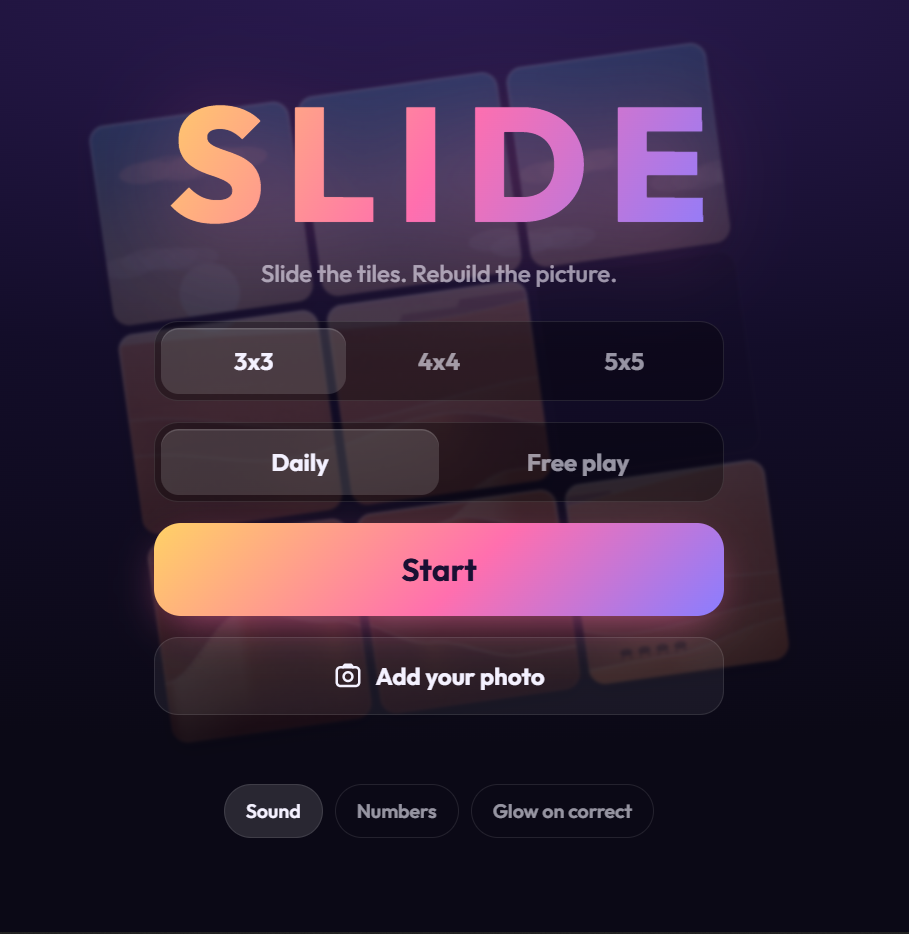
Title screen: the logo "SLIDE", an animated mini puzzle in the background that quietly scrambles and solves itself, the size selector (3x3, 4x4, 5x5), the Daily and Free play toggle, a big Start button, and the Add your photo button. On the first ever play (remembered in localStorage) show a quick one-line tutorial ("Tap a tile next to the gap.").
HUD: moves, time, a Peek button, an Undo button and a menu button. Compact so the board stays the hero. Large, readable numerals.
Respect prefers-reduced-motion by shortening animations and skipping confetti. Add toggles for sound, tile numbers (show small numbers on tiles, off by default) and the correct-tile glow.
Audio (all WebAudio, no files)
A soft wooden tick per tile landing, with a tiny random pitch variation so it never sounds mechanical.
A gentle swoosh on multi-tile slides.
A rising chime on a tile that locks into its correct spot when the glow toggle is on.
A short, warm victory arpeggio on solve and a bigger one on a new personal best.
A mute button, remembered. Audio starts only after the first tap and must work on iOS Safari. Vibrate briefly on win if supported.
Share, challenge and replay
Result card (share.js): a canvas-rendered image (1080x1350 and 1200x630) in the game's style that includes the solved picture itself (for the photo mode, show a blurred or stylized version and not the user's actual photo, for privacy), the moves, the time, the rank, the size, the mode (Daily with the date, or Free play) and the URL. Buttons: Save image, Copy result text, Play again.
Copy text format (short, made for X): Slide 4x4: solved in 72 moves, 2:41. Sharp. Can you beat it? <challenge link>. The link must reproduce the exact same puzzle.
Replay speed: from the result to a new puzzle in one tap. No reload, no menu detour.
Quality, mobile and performance
Works from 360px width up with no horizontal scroll, in portrait and landscape. The board is as large as the screen allows. Handle device pixel ratio (cap at 2).
60 fps on a mid-range phone, including a 5x5 board with the glow on. Pre-render each tile's picture once into an offscreen canvas and reuse it.
No console errors. Pause the timer when the tab is hidden. Never let the timer run while the menu is open.
Everything stored in localStorage is wrapped in try and catch, and the game works without it. Store personal bests per size and mode, and the settings.
Open Graph and Twitter tags in the head with a good title and description, and a small inline SVG favicon.
Finish line: deliver all of this
The complete working game in the project folder, all tests passing, checked at 360px, 768px and desktop widths with no console errors, with a screenshot of each of the 8 pictures at 3x3 and a note on any that look weak (then fix them).
A _deploy folder with only the files the live site needs, and the exact command to deploy it to Vercel (npx vercel --prod from inside _deploy, creating a new project named slide-puzzle). Do not try to log in or deploy yourself.
A Prompted post pack, ready to paste: a punchy title under 70 characters, a short caption (what it is, one surprising detail about making it, how to play), the tools list, a "prompt behind it" version of this brief cut to under about 1,500 characters plus 3 realistic follow-up prompts, and a 15 to 20 second screen-recording shot list.
A short honest report: what you tested and the results, and what you could not verify (for example real-phone feel, drag on touch, and sound).
Working rules
Do not add features outside this brief without asking. If time is tight, cut breadth, never quality.
Do not claim anything works until you have run it. If you cannot see or hear something, say so.
Keep it fun above all. If a slide feels laggy, a drag feels off, a picture is too flat to solve or a rank feels wrong when you play it, fix it.