DMDecoder
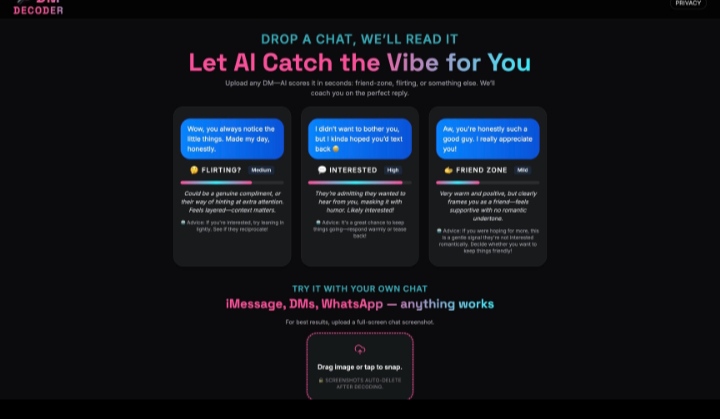
DMDecoder was created by an independent developer for a Lovable build challenge.
The idea came from a familiar experience: receiving a message and not knowing what the other person intended.
Instead of guessing, the creator built a small AI application where users could upload a conversation screenshot and explore possible meanings.
Using Lovable, GPT-4o Vision, Supabase and Stripe, the project was reportedly developed in under 24 hours.
It demonstrates how one focused problem can become a usable AI-powered web product through rapid development.
Tech stack
- Claude
Links
Prompt
PROJECT: DMDECODER — AI CONVERSATION INTELLIGENCE STUDIO

Project Vision

Build a beautifully designed AI-powered web application that helps people better understand the possible tone, emotional signals and communication patterns in everyday digital conversations.

The central experience should be extremely simple: upload a screenshot of a conversation, allow AI to analyze the visible messages, and receive a clear, thoughtful interpretation along with useful response suggestions.

The application should work with screenshots from messaging platforms such as WhatsApp, Instagram, iMessage, Telegram and other chat applications.

Create an original product identity inspired by conversational intelligence rather than copying an existing application.

Build a focused, working product that an independent developer can realistically launch using Lovable and modern AI APIs.

1. Premium Interactive Landing Page

Design a visually memorable dark-themed homepage using deep black backgrounds, electric blue and pink accents, and elegant typography.

Create a prominent headline:

"Confused by a message? Let AI help you understand the conversation."

The hero section should immediately demonstrate the product with realistic fictional conversation examples.

Display three interactive sample cards showing different communication scenarios:

- Friendly conversation.
- Possible romantic interest.
- Ambiguous or mixed signals.

Each card should reveal a possible interpretation, important context clues and suggested response.

Add subtle hover effects, animated confidence indicators and smooth transitions.

Include a prominent "Analyze Your Chat" button.

Prioritize strong visual hierarchy, readable content and a polished mobile experience.

2. Chat Screenshot Upload

Develop an intuitive drag-and-drop interface for uploading conversation screenshots.

Support PNG, JPG and WebP files.

Allow users to select an image directly from their device.

Implement file validation, image previews, upload progress and clear error messages.

Display a privacy reminder encouraging users to remove names, phone numbers and other unnecessary personal information before uploading.

Allow screenshots to be cropped before analysis.

Do not retain uploaded conversation images longer than necessary for the requested operation.

3. AI Conversation Analysis Engine

Integrate GPT-4o or another supported vision-capable language model through secure backend API routes.

The system should inspect the visible text and conversational context in uploaded images.

Identify:

- Message order and conversation flow.
- Questions and answers.
- Expressed emotions.
- Positive or negative wording.
- Humor and sarcasm where context supports it.
- Potential flirtation.
- Friendly or neutral communication.
- Possible misunderstandings.
- Unclear or mixed conversational signals.

Return a structured analysis containing several plausible interpretations rather than claiming to know someone's hidden intentions.

Clearly communicate uncertainty when information is missing.

Avoid automatically classifying emotional states as established facts.

4. Intelligent Conversation Categories

Create a categorization system for communication patterns.

Support categories such as:

Friendly: Warm, supportive or casual communication.

Interested: Visible signals suggesting engagement or a desire to continue talking.

Possibly Flirtatious: Playful or affectionate language that may indicate romantic interest.

Professional: Work-oriented or formal communication.

Ambiguous: Messages with insufficient context for a reliable interpretation.

Potentially Tense: Language that may indicate frustration or disagreement.

Display category results through elegant cards with concise explanations and visible supporting examples.

Where numerical confidence indicators are used, ensure they represent calibrated model estimates rather than unsupported percentages.

5. Contextual Explanation Engine

Go beyond simple labels.

Explain which visible phrases or conversational patterns contributed to each interpretation.

For example:

"The sender asked a follow-up question, suggesting they may be interested in continuing the conversation."

Or:

"The message is short and lacks context, so several interpretations remain possible."

Keep explanations concise and grounded in the uploaded content.

Never fabricate messages or invent previous conversations.

6. AI Reply Assistant

Build a dedicated reply-generation feature.

After receiving an analysis, users should be able to request suggested responses.

Provide selectable tones:

- Friendly and casual.
- Confident and direct.
- Warm and thoughtful.
- Playful.
- Professional.
- Polite and reserved.

Generate three alternative responses for each selected tone.

Allow users to edit suggestions and copy their preferred response.

The assistant should help users communicate authentically, not manipulate, pressure or deceive other people.

7. Conversational AI Follow-Up

Introduce an optional AI chat assistant where users can ask follow-up questions about their uploaded conversation.

Example questions:

"Could this message simply be friendly?"

"How can I respond without sounding too serious?"

"What is a polite way to ask for clarification?"

"Can you rewrite my reply to sound more natural?"

The assistant should maintain limited session context and reference only information provided by the user.

Avoid definitive predictions about relationships or other people's private thoughts.

8. Visual Analysis Experience

Design a polished result page containing:

- The analyzed screenshot.
- A primary interpretation.
- Alternative possible interpretations.
- Highlighted supporting message excerpts.
- Concise communication advice.
- Suggested replies.
- Copy and regenerate actions.

Use subtle animated transitions between the upload, processing and results states.

Allow users to expand individual explanations without making the interface unnecessarily complicated.

9. Demo Mode

Create a fully interactive demonstration for visitors who do not want to upload their own conversations.

Provide several fictional message screenshots illustrating common communication scenarios.

Users should be able to select an example and explore a sample analysis.

Clearly label demo results as illustrative rather than presenting them as newly generated personal analyses.

10. Optional Paid Reply Sessions

Implement a simple monetization feature using Stripe Checkout.

Provide an optional five-minute conversational assistance session priced at $1.

Show the price and session duration clearly before payment.

Use server-side payment verification and Stripe webhooks to activate access.

Store session expiration times securely.

Ensure failed payments do not activate paid access.

Prevent accidental duplicate charges and provide transparent refund and support information.

Keep a limited free analysis experience available.

11. Privacy and Data Protection

Implement secure file handling and privacy-conscious defaults.

Use Supabase for optional authentication and secure storage.

Ensure uploaded images cannot be accessed by unrelated users.

Remove temporary uploads after processing according to a documented retention policy.

Avoid using private message screenshots to train AI models without appropriate consent.

Provide clear deletion options and explain when content is sent to external AI services.

Do not publicly expose analyzed conversations.

12. Technical Architecture

Use Lovable for AI-assisted initial development and iterative improvements.

Build the application using:

- React and TypeScript.
- Tailwind CSS.
- Framer Motion.
- Supabase authentication and storage.
- GPT-4o Vision API.
- Stripe Checkout.
- Secure server-side functions.

Create modular components for image uploading, analysis processing, results visualization, reply suggestions and payments.

Use structured model outputs with schema validation.

Protect API credentials through server-side environment variables.

Implement appropriate rate limits, retries and error handling.

13. Mobile-First Interface

Optimize the entire application for smartphone users.

Ensure screenshots can be uploaded directly from mobile galleries.

Use large touch targets, responsive cards and compact analysis summaries.

Make generated replies easy to copy.

Keep the main analysis experience usable on smaller screens without excessive scrolling.

14. Creative Design Direction

Create a youthful but professional digital identity.

Use dark surfaces, expressive pink and cyan accent colors, smooth micro-interactions and carefully balanced typography.

Display sample conversations through beautifully designed chat bubbles.

Use animated status indicators to communicate processing states.

Avoid crowded dashboards, unnecessary gradients and generic AI chatbot layouts.

The product should look distinctive and approachable.

15. Reliability and Testing

Test screenshot uploads, AI analysis, reply generation, payment verification and session expiration.

Handle blurry images, cropped screenshots, unsupported languages and incomplete conversations.

When an image cannot be interpreted reliably, provide a clear error or uncertainty message.

Never pretend to have analyzed text that is not readable.

Implement appropriate safeguards for abusive or dangerous conversational situations.

Final Deliverables

Build a functional AI conversation-analysis website containing:

1. Premium responsive landing page.
2. Screenshot upload interface.
3. Real AI vision analysis.
4. Contextual interpretation cards.
5. Alternative interpretations and uncertainty indicators.
6. AI-generated reply suggestions.
7. Optional conversational assistant.
8. Interactive demonstration mode.
9. Stripe payment integration.
10. Secure privacy-conscious backend.

Include a complete README, installation steps, environment configuration and deployment instructions.

The final experience should be simple enough that a user can upload a screenshot and understand the result in a few intuitive steps.

Core philosophy: Understand the conversation, consider the context, and respond with confidence.
1 like