Build Lab
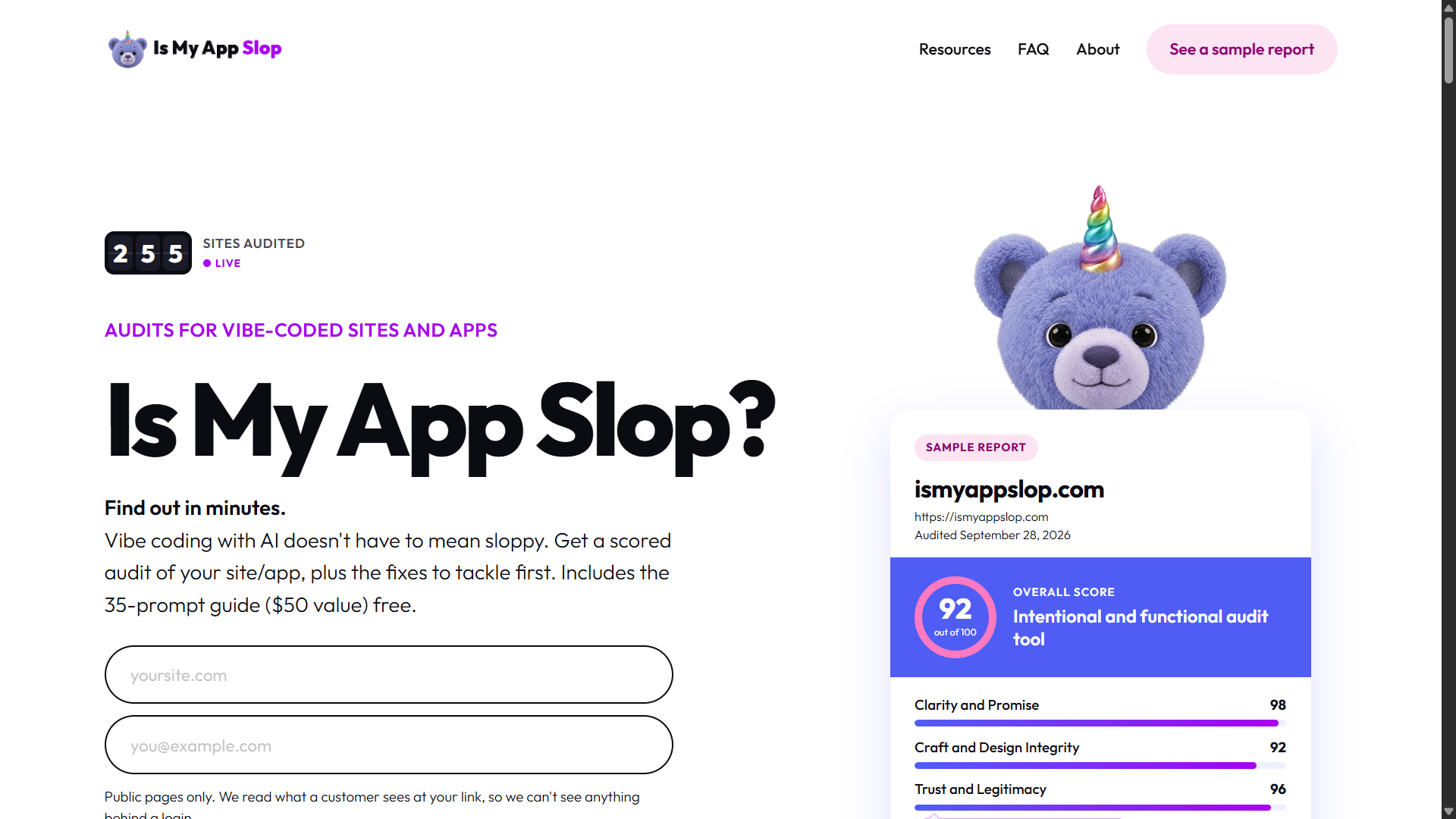
Kathryn Finney, founder of Build Labs, created Is My App Slop to address a growing problem in AI-assisted software development.
AI tools were helping entrepreneurs launch websites faster, but many products still contained generic designs, unclear messaging and broken experiences.
She wanted builders to understand how real visitors would experience their websites before presenting them to customers or investors.
The result is an AI-powered auditing tool that examines public websites, identifies quality problems and recommends practical improvements.
The project was released in October 2026 and is listed as built with Lovable.
Tech stack
- ChatGPT (GPT-6)
- Google AI Studio (4 Argon)
- GitHub Copilot
Links
Prompt
PROJECT: AI WEBSITE QUALITY AUDITOR

Product Vision

Build a premium AI-powered website auditing application that helps independent developers, founders, designers and AI-assisted builders identify weaknesses in their websites before presenting them to customers.

The central problem is that AI coding tools can generate attractive websites quickly, but the resulting products often contain subtle problems that reduce credibility, usability and conversion.

These problems may include generic design choices, inconsistent spacing, vague headlines, broken navigation, nonfunctional buttons, missing trust signals and poor mobile layouts.

Create an intelligent application that analyzes a real public website, evaluates its visible quality against a structured rubric and produces an actionable improvement report.

The platform must evaluate actual website evidence rather than generating generic feedback from a URL.

Make the product achievable as an independent software project using AI-assisted development.

1. Premium Homepage

Create an original, visually distinctive landing page with a clear and memorable identity.

Use a clean off-white background, bold black typography, restrained purple accents and a recognizable custom mascot or illustration.

The hero should communicate the idea immediately:

"Does Your Website Look AI-Generated? Find Out."

Include a large website URL input, short supporting description and prominent "Analyze My Website" button.

Display a sample audit scorecard with realistic example data clearly labeled as a demonstration.

Add a concise explanation of the audit process, supported checks, expected output and pricing.

Use polished micro-interactions, responsive typography and excellent spacing.

Avoid the generic visual patterns the product is designed to identify.

2. Public Website URL Analysis

Build a secure URL submission system.

Users should be able to paste a publicly accessible website URL.

Validate the input and reject malformed URLs, private network addresses, localhost URLs and unsupported schemes.

Use server-side browser automation to inspect the target website.

Analyze the homepage and a limited number of linked public pages.

Capture:

- Rendered page content.
- Desktop screenshots.
- Mobile screenshots.
- Navigation links.
- Visible buttons.
- Form structures.
- Page titles and headings.
- Images and alternative text.
- Responsive layout behavior.
- Important trust and conversion elements.

Implement request limits, crawl-depth restrictions, timeouts and safeguards against server-side request forgery.

Never attempt to bypass authentication or access private pages.

3. AI Website Evaluation Engine

Integrate Anthropic Claude or another suitable vision-capable reasoning model.

Provide the model with actual rendered screenshots, extracted page content and structured browser-testing results.

Create a scoring engine that evaluates six core dimensions.

A. Clarity and Messaging

Determine whether the website clearly communicates what the product does, who it serves and why someone should use it.

Identify vague headlines, unnecessary jargon, confusing value propositions and contradictory messaging.

B. Design Integrity

Evaluate typography, spacing, visual hierarchy, color consistency, component styling, imagery and overall presentation.

Identify repetitive card layouts, inconsistent border radii, low-quality stock images, weak visual hierarchy and excessive decoration.

C. Trust and Credibility

Check for visible contact information, relevant legal pages, consistent branding, transparent pricing and verifiable claims.

Flag potentially misleading testimonials, placeholder content and broken trust signals.

D. Usability and Navigation

Examine whether visitors can understand the interface, navigate between pages and complete the intended primary journey.

Identify confusing controls, dead-end navigation, unclear calls to action and interaction failures.

E. Mobile Experience

Evaluate the website at common mobile viewport dimensions.
Identify overflowing content, difficult-to-read text, small interactive targets, hidden navigation and important actions obscured by overlays.

F. Conversion Experience

Assess whether the website has a clear desired next action.

Review call-to-action placement, form complexity, pricing transparency and friction in the conversion journey.

Use transparent scoring criteria rather than arbitrary AI-generated numbers.

4. Automated Browser Testing

Integrate Playwright to simulate basic website interactions.

Allow the audit system to:

- Load public pages.
- Inspect navigation menus.
- Follow internal links.
- Detect obvious broken links.
- Test non-destructive interactive controls.
- Observe whether buttons trigger expected visible changes.
- Capture mobile and desktop viewport states.
- Identify unexpected errors.

Avoid completing purchases, creating real accounts or submitting production forms without explicit authorization.

Provide a clear permission setting for limited testing of forms using synthetic information.

Record which interactions were tested and which were not.

5. AI-Generated Design Fingerprint Analysis

Build a heuristic system for recognizing common signs of unrefined AI-generated design.

Check for patterns such as:

- Repetitive component structure.
- Excessive gradient backgrounds.
- Generic headlines.
- Unnecessary glowing effects.
- Inconsistent icon styles.
- Repeated placeholder illustrations.
- Overly large dashboard cards.
- Weak differentiation between sections.
- Unclear visual identity.

Do not claim to determine definitively whether AI created the website.

Instead, explain which observable design patterns resemble frequently reused templates and why they may weaken the user experience.

6. Structured Scoring Dashboard

Create a professional results dashboard.

Display an overall website quality score from 0 to 100.

Provide individual scores for all six evaluation categories.

Use a transparent, documented weighting system.

Show visual progress bars and concise category explanations.

Every score should be linked to observable evidence.

Distinguish confirmed issues, possible problems and untested functionality.

Avoid assigning perfect scores to categories that could not be evaluated.

7. Actionable Improvement Recommendations

For every identified problem, generate a specific improvement recommendation.

Each issue should contain:

- Problem title.
- Severity level.
- Affected page or component.
- Evidence supporting the finding.
- Explanation of why it matters.
- Recommended solution.
- Estimated implementation complexity.
- Copy-ready AI coding prompt.

Prioritize high-impact usability and functionality issues over minor decorative changes.

The goal should be to help users fix actual problems rather than merely criticize the website's appearance.

8. AI Fix Prompt Generator

Develop a feature that converts audit findings into development instructions suitable for AI coding assistants.

Support prompt formats optimized for general coding workflows using ChatGPT, Claude, Cursor, Lovable, Bolt and Replit.

For example, if the audit finds that the primary mobile CTA is hidden, generate a prompt requesting a precise responsive layout correction.

Each prompt should explain:

- The current problem.
- Expected behavior.
- Required changes.
- Visual constraints.
- Accessibility considerations.
- Acceptance criteria.
- Relevant test cases.

Do not invent filenames or component paths that have not been inspected.

If source-code context is unavailable, write implementation-agnostic instructions.

Provide an easy Copy Prompt action.

9. Interactive Audit Results

Create a dashboard where users can inspect findings by category and priority.

Support expandable issue cards, filters, severity indicators and screenshots when available.

Allow users to mark recommendations as reviewed or resolved.

Provide a clear distinction between the evaluation and actual fixes made to the website.

Include a summary showing the most important improvements to make first.

10. AI Competitor Comparison
Implement an optional comparison feature.

Users should be able to submit one or two public competitor URLs or approve relevant competitors found through supported research.

Analyze comparable public information from those websites.

Compare clarity, design presentation, trust signals and conversion approaches.

Highlight meaningful differences without assuming that the highest-scoring design will necessarily produce the most sales.

Show source URLs and observation timestamps.

11. PDF Audit Report

Allow users to download a beautifully designed audit report.

The report should include:

- Website name and submitted URL.
- Audit date.
- Overall quality score.
- Category score breakdown.
- Executive summary.
- Important strengths.
- Confirmed problems.
- Supporting screenshots.
- Prioritized improvement recommendations.
- Copy-ready development prompts.
- Scope and limitations of the audit.

Use professional typography, clear charts and readable page layouts.

Generate the PDF using a reliable server-side document rendering system.

12. Example Audit Experience

Create a publicly accessible demonstration using a fictional website or an authorized real example.

Visitors should be able to explore the scoring dashboard and improvement suggestions without paying.

Make sample content clearly identifiable as demonstration data.

Use the example to show what a completed audit contains before users enter their own website.

13. Payment and Audit Processing

Integrate Stripe Checkout for optional paid audits.

Support one-time purchases rather than requiring subscriptions.

Display the exact cost before payment.

Use verified payment webhooks to authorize processing.

Implement an asynchronous audit queue so browser testing and AI analysis can continue reliably after checkout.

Store audit status and allow users to revisit or retrieve completed reports.

Provide email delivery of report links and appropriate refund handling.

14. Security and Privacy

Implement strict URL validation and isolated browser environments.

Prevent the auditing engine from reaching private infrastructure or internal services.

Limit the number of pages, requests and interactions per audit.

Protect uploaded screenshots and audit results.

Do not store sensitive customer information unnecessarily.

Require explicit authorization before testing websites in ways that could create or modify data.

Do not claim the product provides a comprehensive security audit, penetration test or formal accessibility certification.

15. Technical Architecture

Use Lovable or Cursor as the AI-assisted development environment.

Build the frontend with React, TypeScript and Tailwind CSS.

Use Framer Motion for purposeful animations.

Implement a Node.js backend with authenticated API routes.

Use Playwright for controlled browser automation.

Use Anthropic Claude API for visual reasoning and structured website evaluation.

Use PostgreSQL and Supabase for audit records and optional user authentication.

Use Redis and BullMQ for processing longer-running audit jobs.

Use Stripe Checkout for payments.

Generate downloadable PDF reports using a suitable rendering library.

Deploy the frontend through Vercel and host the browser automation worker in an environment compatible with headless Chromium.

These are recommended technologies for a similar implementation, not confirmed details of the original project's internal stack.

16. Premium Visual Design

Create a recognizable product aesthetic.

Use a clean white or warm-neutral background, bold black headlines and carefully controlled purple accents.

Introduce a unique mascot or recognizable visual symbol.

Design compact scorecards, polished assessment charts and evidence-focused issue panels.

Make the website feel trustworthy and deliberately crafted.

Avoid unnecessary animations, generic component libraries without customization and repeated AI-generated visual clichés.

17. Development Roadmap

Phase One: Build the landing page, URL submission interface and sample report.
Phase Two: Implement secure public-page crawling, screenshot capture and browser testing.

Phase Three: Add structured AI evaluation and the six-category scoring engine.

Phase Four: Implement actionable findings and AI coding prompt generation.

Phase Five: Add report exports, payments and asynchronous processing.

Phase Six: Add competitor comparisons, audit history and advanced analysis.

Test each stage independently before expanding functionality.

Final Deliverables

Create a functional AI-powered website quality auditing platform containing:

- Premium public landing page.
- Secure website URL submission.
- Automated public-page inspection.
- Desktop and mobile screenshot analysis.
- Six-category evaluation rubric.
- AI-generated quality assessments.
- Actionable development recommendations.
- Copy-ready coding prompts.
- Professional results dashboard.
- Downloadable PDF reports.
- Public sample audit.
- Optional Stripe payment integration.

The final product should help AI-assisted builders identify problems that make their websites feel unfinished and provide clear instructions for improving them.

Core Principle: AI makes building faster. Thoughtful evaluation makes the result better.