Photostudio
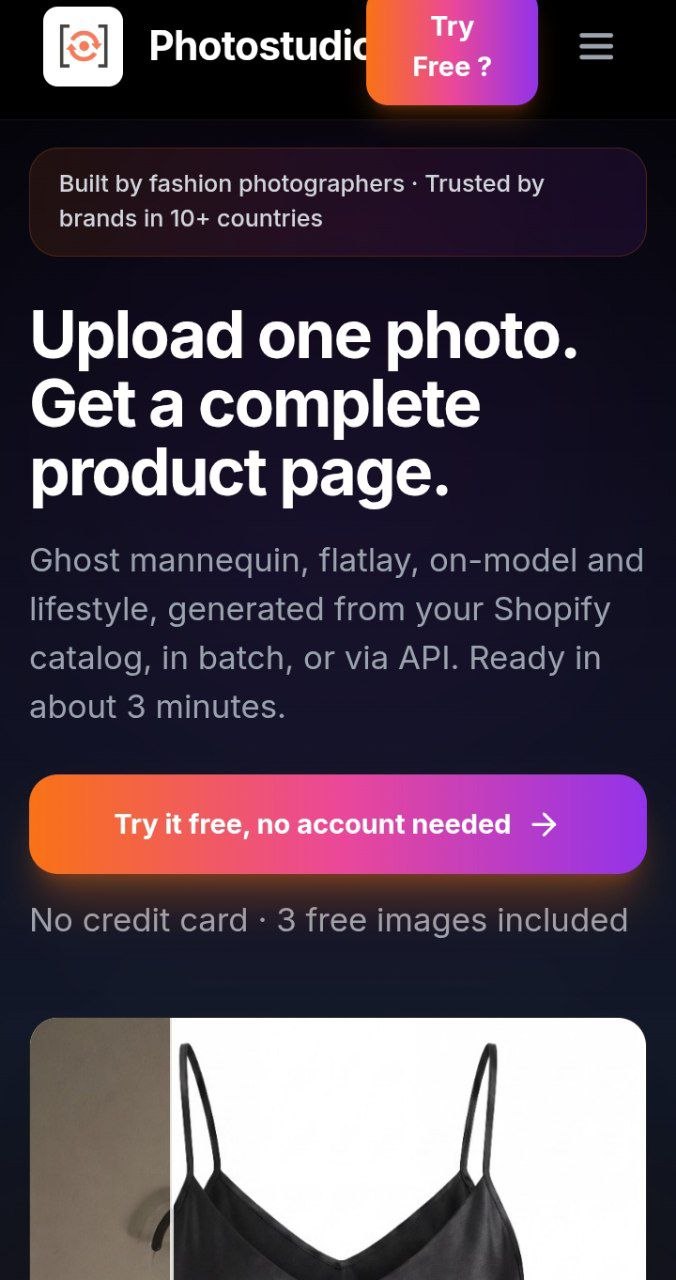
Photostudio.io was founded by Belgian entrepreneur Peter Peeters to make professional product photography more accessible to fashion brands.
He used Lovable to help build a platform that transforms ordinary garment photos into polished commercial images.
The idea addresses a practical problem: independent fashion sellers often need high-quality imagery but cannot afford traditional photoshoots for every product.
By combining AI-generated imagery with a simple e-commerce workflow, Photostudio helps sellers create more product visuals from fewer original photographs.
Tech stack
- ChatGPT
- Claude
- Antigravity
- Astra (GPT-6 Astra)
Links
Prompt
Include safeguards for recognizable real-person likenesses and require authorization for user-supplied model references.

6. AI Lifestyle and Campaign Generator

Create a creative environment generator that places products into realistic commercial photography scenes.

Support presets such as:

- Minimalist fashion studio.
- Luxury apartment.
- Urban streetwear location.
- Contemporary architectural setting.
- Outdoor lifestyle environment.
- Editorial fashion campaign.

Allow users to specify lighting, mood, camera angle, location style and visual atmosphere.

Use structured prompts to preserve product appearance while generating contextually appropriate surroundings.

Provide multiple creative variations for each scene.

7. Complete Campaign Generation

Implement a feature called "Generate Campaign."

The user uploads a product photograph, selects the desired output formats and starts one generation job.

The application should produce an organized set of images, potentially including:

1. Ghost-mannequin catalog image.
2. Neutral-background flatlay.
3. Front-facing on-model photograph.
4. Lifestyle campaign visual.
5. Social media promotional composition.
6. Detailed product close-up.

Each format should be generated through its own specialized prompt and processing settings.

Provide progress indicators for each asset and allow failed outputs to be regenerated individually.

8. Product Fidelity Review

Implement an AI-assisted visual quality review.

Compare generated results with the original garment photograph.

Check for visible changes in color, stitching, logos, patterns, garment structure and accessories.

Present potential inconsistencies as warnings with clear explanations.

Provide side-by-side comparison and adjustable zoom.

Never automatically certify generated images as physically accurate when the source does not provide sufficient evidence.

Let the seller approve each image before export.

9. Intelligent Prompt Engine

Integrate Anthropic Claude or another suitable language model to convert user selections into structured image-generation instructions.

The engine should consider garment category, visible material, desired output type, background, lighting and creative direction.

Generate specialized prompts for ghost-mannequin, flatlay, model photography and lifestyle outputs.

Keep garment preservation requirements separate from creative background instructions.

Use deterministic validation to ensure required fields are included.

The user should not need to write complex prompts manually.

10. Interactive Image Workspace

Design a modern studio interface with three primary regions.

Left panel: Uploaded products, image styles and generation settings.

Central workspace: Large image preview with zoom, comparison and variation selection.

Right panel: Generation history, quality warnings and export settings.

Allow users to select, rename, favorite, regenerate and delete generated images.

Implement loading skeletons, progress states and useful error messages.

Keep the interface compact, responsive and visually refined.

11. E-Commerce Export System

Allow users to download generated images in PNG, JPG and WebP formats.

Offer standard output presets for product listings, square marketplace thumbnails, website banners and social media promotions.

Implement aspect-ratio adjustment and high-quality rendering where supported.

Allow users to export individual images or download an entire campaign as a ZIP file.

Preserve image metadata required for proper organization without unnecessarily exposing personal information.

12. Product and Campaign Library

Develop a dashboard that stores uploaded garments and their generated assets.

Organize the library around products, collections and campaigns.

Each product should have a name, category, source image, generated variations and creation history.

Allow users to revisit previous generations, reuse approved creative settings and produce additional images.

Include basic search, filtering and project management.

13. Usage Credits
Implement a transparent credit system for AI generations.

Offer a limited free trial and optional paid plans.

Display the expected credit cost before starting a job.

Deduct credits only according to clearly defined processing rules.

Use Stripe for optional subscriptions and payment processing.

Securely verify payment webhooks before updating account balances.

Allow users to view their credit balance and generation history.

14. Technology Stack

Use Lovable as an AI-assisted development environment for creating and iterating on the application.

Implement the frontend with React, TypeScript and Tailwind CSS.

Use Framer Motion for subtle, meaningful animations.

Use Supabase for authentication, PostgreSQL database storage and secure file management.

Integrate a capable image-generation API that supports reference-guided editing.

Use Claude API for prompt construction and structured generation planning.

Implement server-side generation requests, asynchronous job tracking, output validation, retry handling and rate limiting.

Keep all API keys and sensitive credentials off the client.

These are proposed technologies for the reconstructed application, not a claim about every service Photostudio currently uses.

15. Custom Visual Design

Build an original premium interface with a fashion-editorial personality.

Use deep charcoal, warm off-white and a single restrained accent color.

Choose elegant typography with clear size hierarchy.

Make product photographs the main visual attraction.

Use large previews, generous whitespace, minimal controls and sophisticated micro-interactions.

Avoid generic AI dashboards, excessive gradients and unnecessary decorative elements.

The platform should feel like a professional creative studio.

16. Reliability and Security

Implement secure authentication and user-specific access controls.

Protect uploaded images and generated assets using private storage and signed URLs.

Validate file types and sizes.

Handle model timeouts, failed image requests and incomplete outputs gracefully.

Provide clear data deletion options.

Test major workflows on desktop and mobile devices.

Include safeguards against unauthorized use of identifiable people's likenesses.

17. Final Deliverables

Build a working application containing:

- A premium public website.
- Product photo uploader.
- AI ghost-mannequin generator.
- AI flatlay creator.
- Virtual-model photography workflow.
- Lifestyle image generator.
- Multi-image campaign generation.
- Before-and-after comparison.
- Product fidelity review.
- Image library and downloads.
- Optional account and credit management.

Prioritize working upload-to-generation-to-download functionality before implementing advanced integrations.

Deliver production-quality source code, environment configuration, database setup and a clean README.

Final Objective

Create a focused, beautifully designed AI fashion photography application that helps independent sellers turn ordinary product images into professional visual content.

Core principle: One product photo. Multiple creative possibilities.
1 like